
領先一步
VMware 提供培訓和認證,助您加速進步。
瞭解更多在這兩部分的部落格文章中,我將討論我對 Spring Petclinic 所做的修改,以整合一個 AI 助手,允許使用者使用自然語言與應用程式互動。
Spring Petclinic 是 Spring 生態系統中的主要參考應用程式。根據 GitHub 的資料,該倉庫於 2013 年 1 月 9 日建立。自那時起,它已成為使用 Spring Boot 編寫簡單、對開發者友好的程式碼的典範應用。截至本文撰寫之時,它已獲得超過 7,600 顆星和 23,000 個分叉。
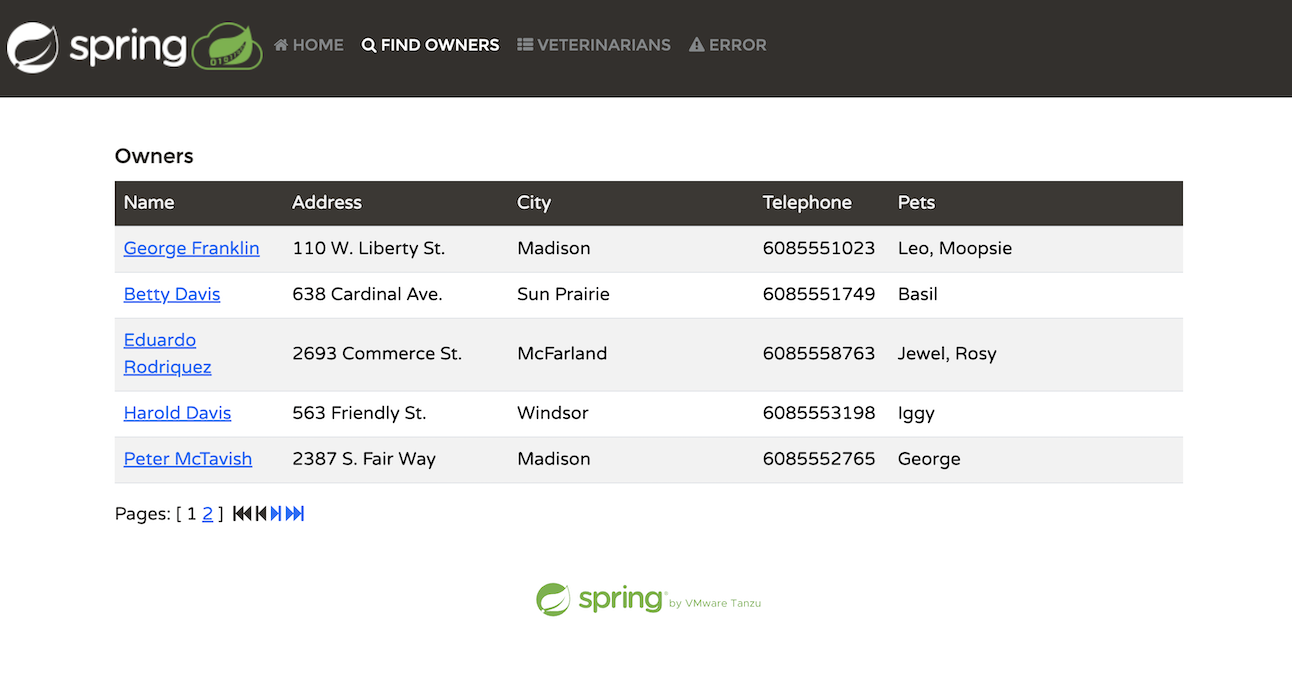
該應用程式模擬獸醫寵物診所的管理系統。在應用程式中,使用者可以執行以下幾項活動:
列出寵物主人
新增新主人
為主人新增寵物
記錄特定寵物的就診情況
列出診所的獸醫
模擬伺服器端錯誤
雖然該應用程式簡單直接,但它有效地展示了開發 Spring Boot 應用程式的便捷性。
此外,Spring 團隊不斷更新該應用程式,以支援 Spring Framework 和 Spring Boot 的最新版本。
Spring Petclinic 是使用 Spring Boot 開發的,截至本出版物釋出時,具體版本為 3.3。
前端 UI 使用 Thymeleaf 構建。Thymeleaf 的模板引擎促進了 HTML 程式碼中無縫的後端 API 呼叫,使其易於理解。以下是檢索寵物主人列表的程式碼:
<table id="vets" class="table table-striped">
  <thead>
  <tr>
    <th>Name</th>
    <th>Specialties</th>
  </tr>
  </thead>
  <tbody>
  <tr th:each="vet : ${listVets}">
    <td th:text="${vet.firstName + ' ' + vet.lastName}"></td>
    <td><span th:each="specialty : ${vet.specialties}"
              th:text="${specialty.name + ' '}"/> <span
      th:if="${vet.nrOfSpecialties == 0}">none</span></td>
  </tr>
  </tbody>
</table>
這裡的關鍵行是 ${listVets},它引用了 Spring 後端中包含要填充資料的模型。以下是 Spring @Controller 中填充此模型的相關程式碼塊:
	private String addPaginationModel(int page, Page<Vet> paginated, Model model) {
		List<Vet> listVets = paginated.getContent();
		model.addAttribute("currentPage", page);
		model.addAttribute("totalPages", paginated.getTotalPages());
		model.addAttribute("totalItems", paginated.getTotalElements());
		model.addAttribute("listVets", listVets);
		return "vets/vetList";
	}
Petclinic 使用 Java 持久化 API (JPA) 與資料庫互動。它支援 H2、PostgreSQL 或 MySQL,具體取決於所選的配置檔案。資料庫通訊透過 @Repository 介面(如 OwnerRepository)進行。以下是介面中一個 JPA 查詢的示例:
	/**
	 * Returns all the owners from data store
	 **/
	@Query("SELECT owner FROM Owner owner")
	@Transactional(readOnly = true)
	Page<Owner> findAll(Pageable pageable);
JPA 透過根據命名約定自動實現方法的預設查詢,顯著簡化了程式碼。它還允許您在需要時使用 @Query 註解指定 JPQL 查詢。
Spring AI 是 Spring 生態系統中近年來最令人興奮的新專案之一。它使您能夠使用熟悉的 Spring 正規化和技術與流行的大型語言模型 (LLM) 進行互動。就像 Spring Data 提供了一個抽象,允許您編寫一次程式碼,將實現委託給提供的 spring-boot-starter 依賴項和屬性配置一樣,Spring AI 為 LLM 提供了類似的方法。您只需為介面編寫一次程式碼,並且在執行時會為您的特定實現注入一個 @Bean。
Spring AI 支援所有主要的大型語言模型,包括 OpenAI、Azure 的 OpenAI 實現、Google Gemini、Amazon Bedrock 以及 更多模型。
Spring Petclinic 已經有超過 10 年的歷史,最初設計時並未考慮 AI。它是一個經典的測試用例,用於測試 AI 與“傳統”程式碼庫的整合。在解決向 Spring Petclinic 新增 AI 助手的挑戰時,我必須考慮幾個重要因素。
首先要考慮的是確定我想要實現的 API 型別。Spring AI 提供了各種功能,包括支援聊天、影像識別和生成、音訊轉錄、文字轉語音等。對於 Spring Petclinic 來說,一個熟悉的“聊天機器人”介面最有意義。這將允許診所員工使用自然語言與系統進行交流,簡化他們的互動,而不是透過 UI 選項卡和表單進行導航。我還需要嵌入功能,這將在本文後面用於檢索增強生成 (RAG)。
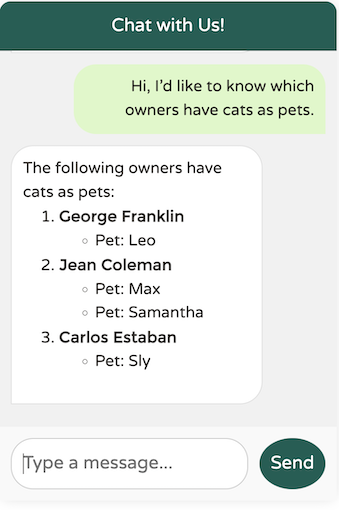
與 AI 助手的可能互動包括:
我能如何幫助您?
請列出我們診所的寵物主人。
哪些獸醫擅長放射學?
有叫 Betty 的寵物主人嗎?
哪些主人有狗?
為 Betty 新增一隻狗;它的名字叫 Moopsie。
這些示例說明了 AI 可以處理的查詢範圍。LLM 的優勢在於它們能夠理解自然語言並提供有意義的響應。
科技界目前正在經歷一場大型語言模型 (LLM) 的淘金熱,每隔幾天就會出現新的模型,每個模型都提供增強的功能、更大的上下文視窗和高階功能,例如改進的推理能力。
一些流行的 LLM 包括:
OpenAI 及其基於 Azure 的服務,Azure OpenAI
Google Gemini
Amazon Bedrock,一項託管的 AWS 服務,可以執行各種 LLM,包括 Anthropic 和 Titan
Llama 3.1,以及透過 Hugging Face 提供的許多其他開源 LLM
對於我們的 Petclinic 應用程式,我需要一個在聊天能力方面表現出色、可以根據我應用程式的特定需求進行定製並支援函式呼叫(稍後會詳細介紹!)的模型。
Spring AI 的一大優勢是易於對各種 LLM 進行 A/B 測試。您只需更改一個依賴項並更新幾個屬性。我測試了幾個模型,包括我在本地執行的 Llama 3.1。最終,我得出結論,OpenAI 在這個領域仍然是領導者,因為它提供了最自然、最流暢的互動,同時避免了其他 LLM 遇到的常見陷阱。
這是一個基本示例:當向由 OpenAI 提供支援的模型打招呼時,響應如下:
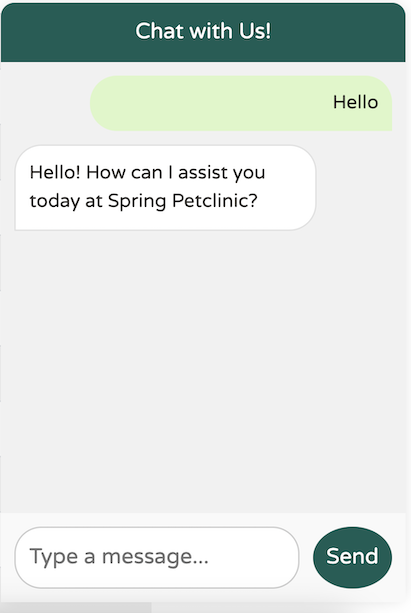
完美。正是我想要的。簡單、簡潔、專業且使用者友好。
這是使用 Llama3.1 的結果:
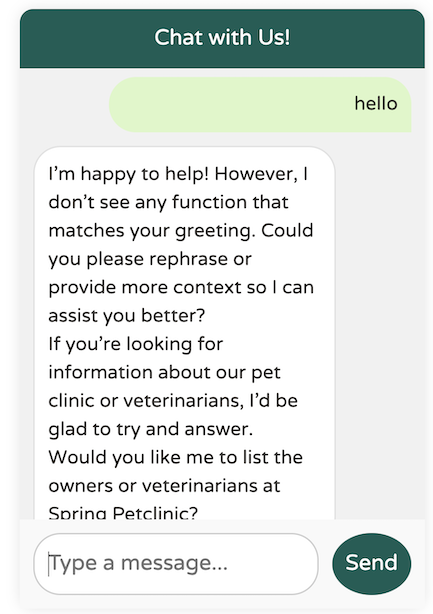
您明白我的意思。它還沒達到那個水平。
設定所需的 LLM 提供商非常簡單——只需在 pom.xml(或 build.gradle)中設定其依賴項,並在 application.yaml 或 application.properties 中提供必要的配置屬性即可。
	<dependency>
		<groupId>org.springframework.ai</groupId>
		<artifactId>spring-ai-azure-openai-spring-boot-starter</artifactId>
	</dependency>
在這裡,我選擇了 Azure 對 OpenAI 的實現,但我可以透過更改依賴項輕鬆切換到 Sam Altman 的 OpenAI。
	<dependency>
		<groupId>org.springframework.ai</groupId>
		<artifactId>spring-ai-openai-spring-boot-starter</artifactId>
	</dependency>
由於我使用的是公共託管的 LLM 提供商,我需要提供 URL 和 API 金鑰才能訪問 LLM。這可以在 application.yaml 中配置。
spring:
  ai:
    #These parameters apply when using the spring-ai-azure-openai-spring-boot-starter dependency:
    azure:
      openai:
        api-key: "the-api-key"
        endpoint: "https://the-url/"
        chat:
          options:
             deployment-name: "gpt-4o"
    #These parameters apply when using the spring-ai-openai-spring-boot-starter dependency:
    openai:
      api-key: ""
      endpoint: ""
      chat:
        options:
           deployment-name: "gpt-4o"
我們的目標是建立一個 WhatsApp/iMessage 風格的聊天客戶端,並將其與 Spring Petclinic 的現有 UI 整合。前端 UI 將呼叫接受字串作為輸入並返回字串作為輸出的後端 API 端點。對話將對使用者可能提出的任何問題開放,如果某個請求我們無法提供幫助,我們將提供適當的響應。
這是 PetclinicChatClient 類中聊天端點的實現:
  @PostMapping("/chatclient")
  public String exchange(@RequestBody String query) {
	  //All chatbot messages go through this endpoint and are passed to the LLM
	  return
	  this.chatClient
	  .prompt()
      .user(
          u ->
              u.text(query)
              )
      .call()
      .content();
  }
API 接受字串查詢並將其作為使用者文字傳遞給 Spring AI ChatClient bean。ChatClient 是由 Spring AI 提供的 Spring Bean,它負責將使用者文字傳送到 LLM 並返回 content() 中的結果。
所有 Spring AI 程式碼都在名為
openai的特定@Profile下執行。一個附加類PetclinicDisabledChatClient在使用預設配置檔案或任何其他配置檔案時執行。此停用配置檔案僅返回一條訊息,指示聊天不可用。
我們的實現主要將責任委託給 ChatClient。但是我們如何建立 ChatClient bean 本身呢?有幾個可配置選項可以影響使用者體驗。讓我們逐一探討它們並檢查它們對最終應用程式的影響:
這是一個精簡、未修改的 ChatClient bean 定義:
	public PetclinicChatClient(ChatClient.Builder builder) {
		this.chatClient = builder.build();
  }
在這裡,我們僅根據依賴項中當前可用的 Spring AI 啟動器從構建器請求 ChatClient 例項。雖然此設定有效,但我們的聊天客戶端缺乏對 Petclinic 領域或其服務的任何瞭解:
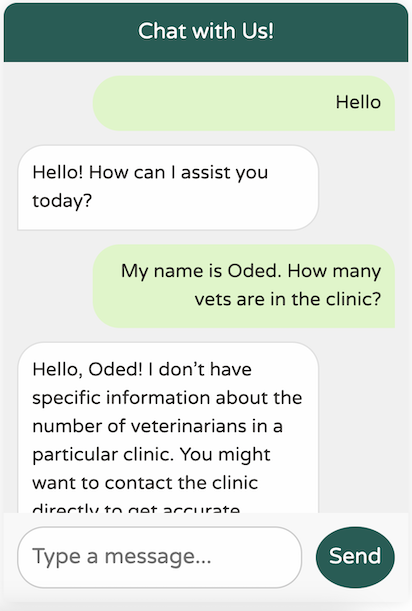
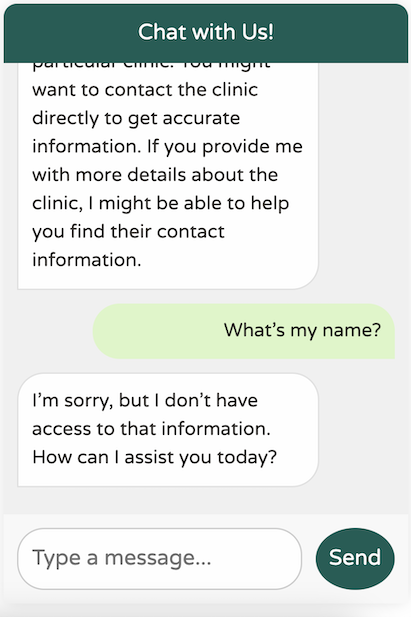
它當然很有禮貌,但它對我們的業務領域缺乏任何理解。此外,它似乎患有嚴重的失憶症——它甚至不記得我上一條訊息中的名字!
當我審閱這篇文章時,我意識到我沒有 聽從我好朋友兼同事 Josh Long 的建議。我可能應該對我們的新 AI 主人更客氣一點!
您可能已經習慣了 ChatGPT 出色的記憶力,這讓它感覺像是對話。然而,實際上,LLM API 是完全無狀態的,不會保留您傳送的任何歷史訊息。這就是為什麼 API 如此快地忘記我的名字。
您可能想知道 ChatGPT 如何維持對話上下文。答案很簡單:ChatGPT 將過去的對話作為內容隨每條新訊息一起傳送。每次您傳送新訊息時,它都會包含以前的對話供模型參考。雖然這看起來可能有些浪費,但系統就是這樣運作的。這也是為什麼更大的 token 視窗變得越來越重要——使用者期望能夠重新訪問幾天前的對話,並從他們上次離開的地方繼續。
讓我們在應用程式中實現類似的“聊天記憶”功能。幸運的是,Spring AI 提供了一個開箱即用的 Advisor 來幫助實現這一點。您可以將 Advisor 視為在呼叫 LLM 之前執行的鉤子。將它們視為類似於面向切面程式設計的建議會很有幫助,即使它們不是以這種方式實現的。
這是我們更新後的程式碼:
 	public PetclinicChatClient(ChatClient.Builder builder, ChatMemory chatMemory) {
		// @formatter:off
		this.chatClient = builder
				.defaultAdvisors(
						// Chat memory helps us keep context when using the chatbot for up to 10 previous messages.
						new MessageChatMemoryAdvisor(chatMemory, DEFAULT_CHAT_MEMORY_CONVERSATION_ID, 10), // CHAT MEMORY
						new SimpleLoggerAdvisor()
						)
				.build();
  }
在此更新的程式碼中,我們添加了 MessageChatMemoryAdvisor,它自動將最後 10 條訊息鏈入任何新的傳出訊息,幫助 LLM 理解上下文。
我們還包含了一個開箱即用的 SimpleLoggerAdvisor,它記錄了與 LLM 的請求和響應。
結果:
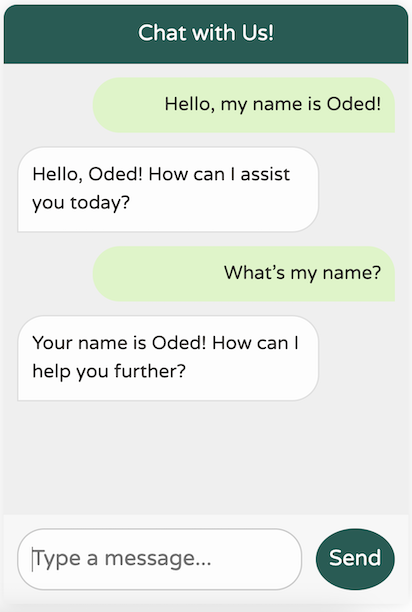
我們的新聊天機器人記憶力顯著提高!
然而,它仍然不完全清楚我們在這裡到底在做什麼:
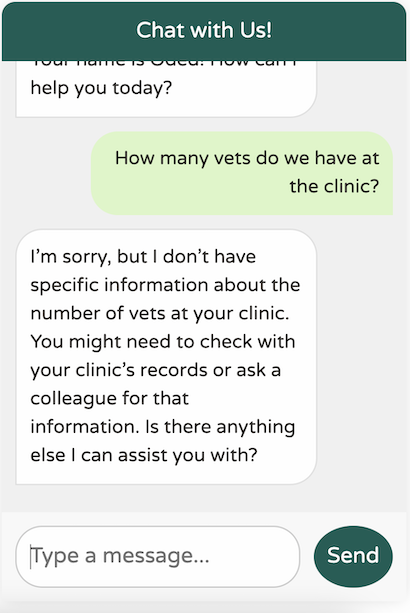
對於通用世界知識的 LLM 來說,這個響應還不錯。然而,我們的診所非常領域特定,具有特殊的用例。此外,我們的聊天機器人應該只專注於幫助我們診所。例如,它不應該嘗試回答這樣的問題:
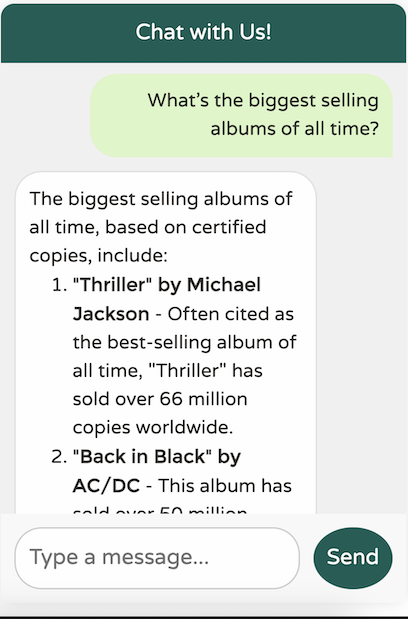
如果允許我們的聊天機器人回答任何問題,使用者可能會開始將其用作 ChatGPT 等服務的免費替代品,以訪問更高階的模型,如 GPT-4。很明顯,我們需要教導我們的 LLM“模仿”特定的服務提供商。我們的 LLM 應該只專注於協助 Spring Petclinic;它應該瞭解獸醫、主人、寵物和就診——僅此而已。
Spring AI 也為此提供瞭解決方案。大多數 LLM 區分使用者文字(我們傳送的聊天訊息)和系統文字,系統文字是指導 LLM 以特定方式執行的通用文字。讓我們將系統文字新增到我們的聊天客戶端:
	public PetclinicChatClient(ChatClient.Builder builder, ChatMemory chatMemory) {
		// @formatter:off
		this.chatClient = builder
				.defaultSystem("""
You are a friendly AI assistant designed to help with the management of a veterinarian pet clinic called Spring Petclinic.
Your job is to answer questions about the existing veterinarians and to perform actions on the user's behalf, mainly around
veterinarians, pet owners, their pets and their owner's visits.
You are required to answer an a professional manner. If you don't know the answer, politely tell the user
you don't know the answer, then ask the user a followup qusetion to try and clarify the question they are asking.
If you do know the answer, provide the answer but do not provide any additional helpful followup questions.
When dealing with vets, if the user is unsure about the returned results, explain that there may be additional data that was not returned.
Only if the user is asking about the total number of all vets, answer that there are a lot and ask for some additional criteria. For owners, pets or visits - answer the correct data.
			      		""")
				.defaultAdvisors(
						// Chat memory helps us keep context when using the chatbot for up to 10 previous messages.
						new MessageChatMemoryAdvisor(chatMemory, DEFAULT_CHAT_MEMORY_CONVERSATION_ID, 10), // CHAT MEMORY
						new LoggingAdvisor()
						)
				.build();
  }
這是一個相當冗長的預設系統提示!但請相信我,這是必要的。事實上,這可能還不夠,隨著系統使用頻率的增加,我可能需要新增更多上下文。提示工程過程涉及設計和最佳化輸入提示,以針對給定用例獲取特定、準確的響應。
LLM 非常健談;它們喜歡用自然語言回覆。這種傾向使得以 JSON 等格式獲取機器對機器的響應變得具有挑戰性。為了解決這個問題,Spring AI 提供了一套專門用於結構化輸出的功能,稱為 結構化輸出轉換器。Spring 團隊必須確定最佳的提示工程技術,以確保 LLM 在沒有不必要的“冗餘”的情況下做出響應。以下是 Spring AI 的 MapOutputConverter bean 的一個示例:
	@Override
	public String getFormat() {
		String raw = """
				Your response should be in JSON format.
				The data structure for the JSON should match this Java class: %s
				Do not include any explanations, only provide a RFC8259 compliant JSON response following this format without deviation.
				Remove the ```json markdown surrounding the output including the trailing "```".
				""";
		return String.format(raw, HashMap.class.getName());
	}
每當 LLM 的響應需要採用 JSON 格式時,Spring AI 都會將整個字串附加到請求中,敦促 LLM 遵守。
最近,這一領域取得了積極進展,尤其是 OpenAI 的結構化輸出(Structured Outputs)計劃。與此類進展常有的情況一樣,Spring AI 全面採納了它。
現在,回到我們的聊天機器人——讓我們看看它的表現如何!
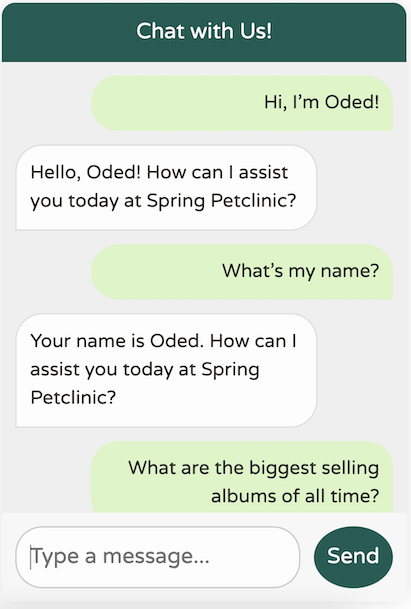
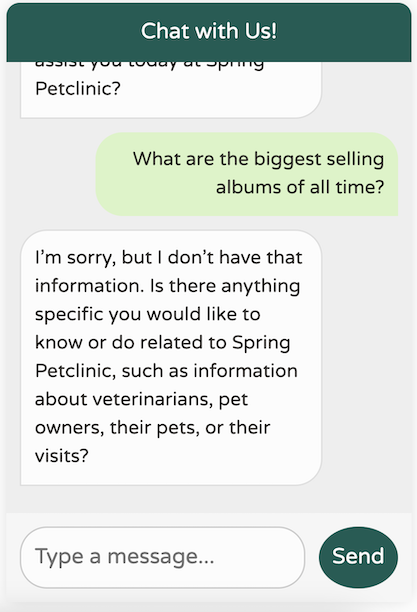
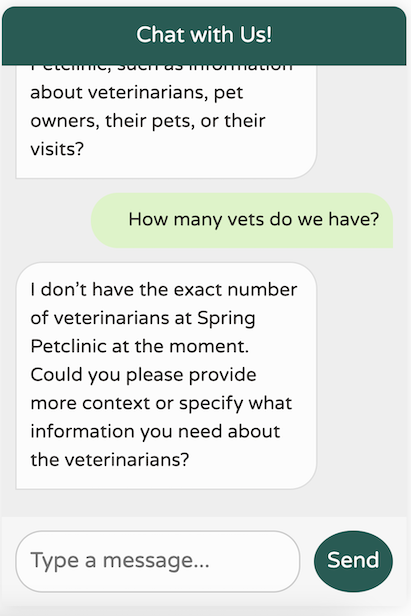
這是一個顯著的進步!我們現在擁有一個針對我們領域進行了調整、專注於我們特定用例的聊天機器人,它能記住最近的 10 條訊息,不提供任何不相關的世界知識,並避免臆造它不具備的資料。此外,我們的日誌會列印我們對 LLM 的呼叫,使除錯變得更加容易。
2024-09-21T21:55:08.888+03:00 DEBUG 85824 --- [nio-8080-exec-5] o.s.a.c.c.advisor.SimpleLoggerAdvisor    : request: AdvisedRequest[chatModel=org.springframework.ai.azure.openai.AzureOpenAiChatModel@5cdd90c4, userText="Hi! My name is Oded.", systemText=You are a friendly AI assistant designed to help with the management of a veterinarian pet clinic called Spring Petclinic.
Your job is to answer questions about the existing veterinarians and to perform actions on the user's behalf, mainly around
veterinarians, pet owners, their pets and their owner's visits.
You are required to answer an a professional manner. If you don't know the answer, politely tell the user
you don't know the answer, then ask the user a followup qusetion to try and clarify the question they are asking.
If you do know the answer, provide the answer but do not provide any additional helpful followup questions.
When dealing with vets, if the user is unsure about the returned results, explain that there may be additional data that was not returned.
Only if the user is asking about the total number of all vets, answer that there are a lot and ask for some additional criteria. For owners, pets or visits - answer the correct data.
, chatOptions=org.springframework.ai.azure.openai.AzureOpenAiChatOptions@c4c74d4, media=[], functionNames=[], functionCallbacks=[], messages=[], userParams={}, systemParams={}, advisors=[org.springframework.ai.chat.client.advisor.observation.ObservableRequestResponseAdvisor@1e561f7, org.springframework.ai.chat.client.advisor.observation.ObservableRequestResponseAdvisor@79348b22], advisorParams={}]
2024-09-21T21:55:10.594+03:00 DEBUG 85824 --- [nio-8080-exec-5] o.s.a.c.c.advisor.SimpleLoggerAdvisor    : response: {"result":{"metadata":{"contentFilterMetadata":{"sexual":{"severity":"safe","filtered":false},"violence":{"severity":"safe","filtered":false},"hate":{"severity":"safe","filtered":false},"selfHarm":{"severity":"safe","filtered":false},"profanity":null,"customBlocklists":null,"error":null,"protectedMaterialText":null,"protectedMaterialCode":null},"finishReason":"stop"},"output":{"messageType":"ASSISTANT","metadata":{"finishReason":"stop","choiceIndex":0,"id":"chatcmpl-A9zY6UlOdkTCrFVga9hbzT0LRRDO4","messageType":"ASSISTANT"},"toolCalls":[],"content":"Hello, Oded! How can I assist you today at Spring Petclinic?"}},"metadata":{"id":"chatcmpl-A9zY6UlOdkTCrFVga9hbzT0LRRDO4","model":"gpt-4o-2024-05-13","rateLimit":{"requestsLimit":0,"requestsRemaining":0,"requestsReset":0.0,"tokensRemaining":0,"tokensLimit":0,"tokensReset":0.0},"usage":{"promptTokens":633,"generationTokens":17,"totalTokens":650},"promptMetadata":[{"contentFilterMetadata":{"sexual":null,"violence":null,"hate":null,"selfHarm":null,"profanity":null,"customBlocklists":null,"error":null,"jailbreak":null,"indirectAttack":null},"promptIndex":0}],"empty":false},"results":[{"metadata":{"contentFilterMetadata":{"sexual":{"severity":"safe","filtered":false},"violence":{"severity":"safe","filtered":false},"hate":{"severity":"safe","filtered":false},"selfHarm":{"severity":"safe","filtered":false},"profanity":null,"customBlocklists":null,"error":null,"protectedMaterialText":null,"protectedMaterialCode":null},"finishReason":"stop"},"output":{"messageType":"ASSISTANT","metadata":{"finishReason":"stop","choiceIndex":0,"id":"chatcmpl-A9zY6UlOdkTCrFVga9hbzT0LRRDO4","messageType":"ASSISTANT"},"toolCalls":[],"content":"Hello, Oded! How can I assist you today at Spring Petclinic?"}}]}
我們的聊天機器人表現符合預期,但它目前缺乏關於我們應用程式中資料的資訊。讓我們重點關注 Spring Petclinic 支援的核心功能,並將其對映到我們可能希望透過 Spring AI 啟用的功能。
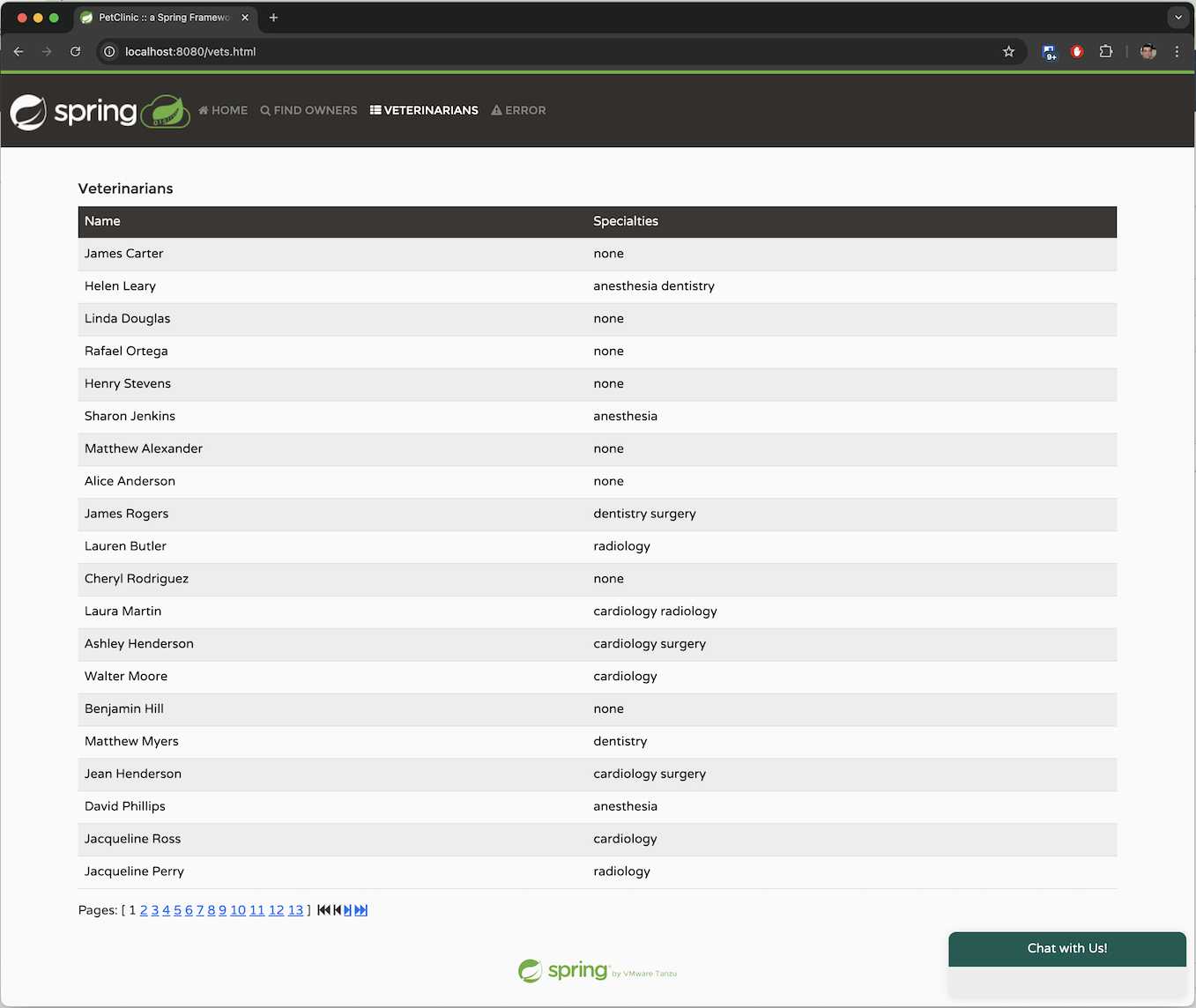
在“所有者”選項卡中,我們可以按姓氏搜尋所有者,或者簡單地列出所有所有者。我們可以獲取每個所有者的詳細資訊,包括他們的名字和姓氏,以及他們擁有的寵物及其型別。
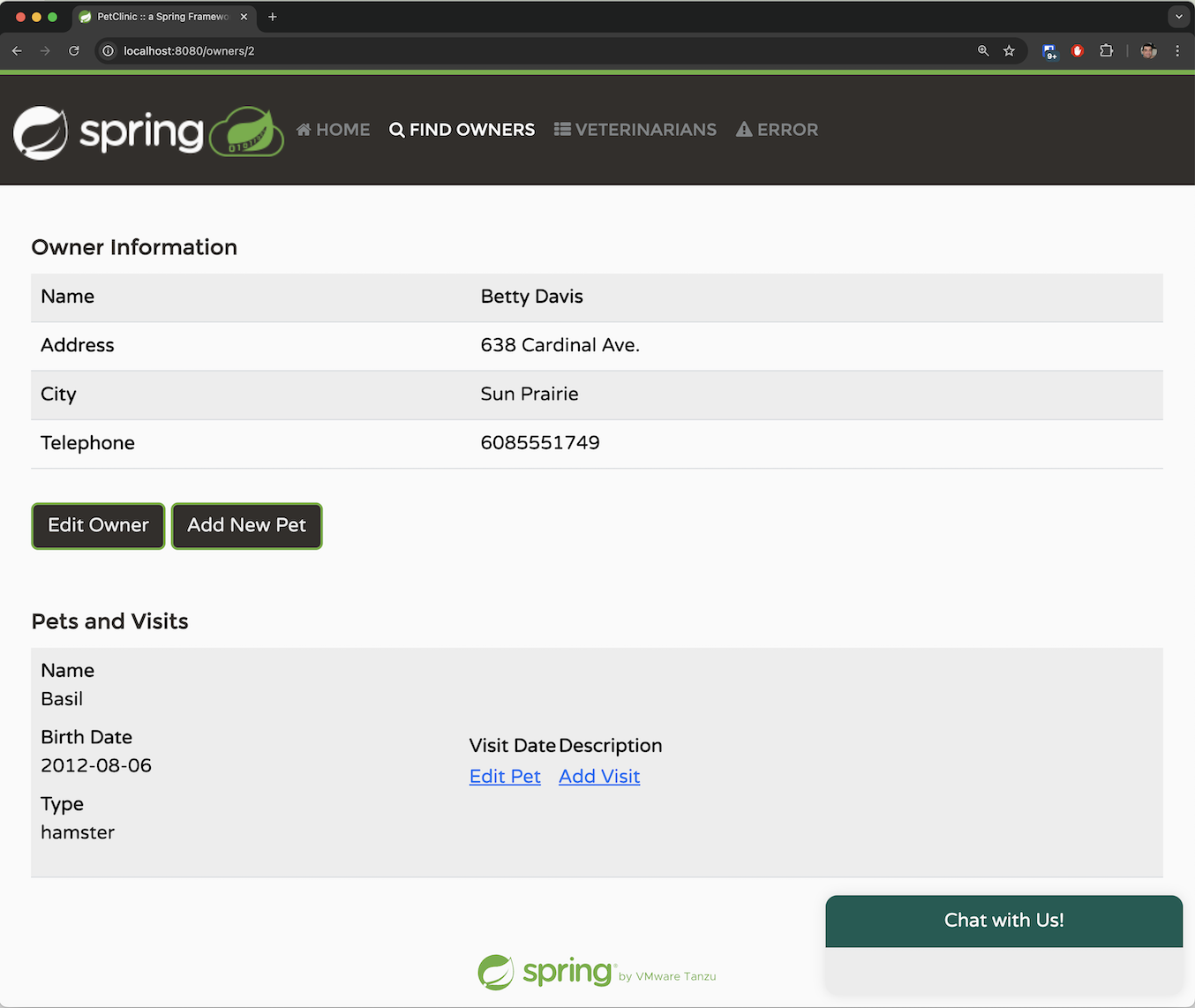
該應用程式允許您透過提供系統要求的必要引數來新增新所有者。所有者必須具有名字、姓氏、地址和 10 位電話號碼。
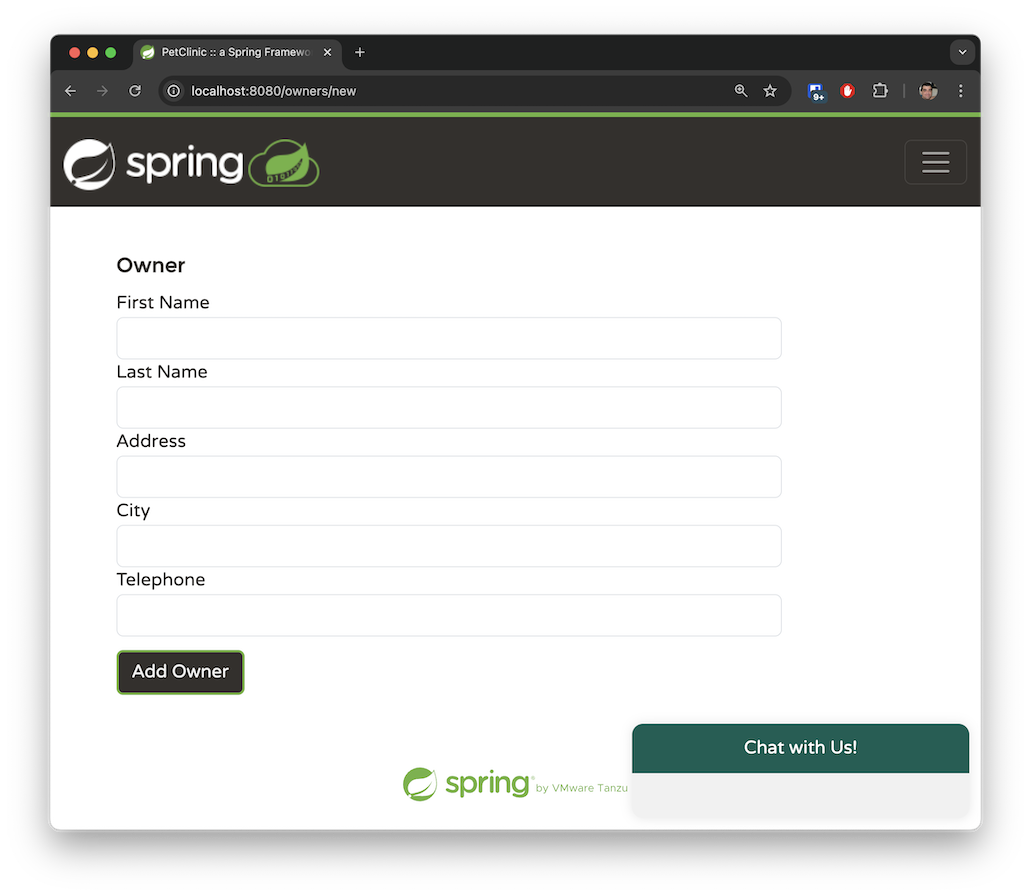
一個主人可以擁有多隻寵物。寵物型別僅限於以下幾種:貓、狗、蜥蜴、蛇、鳥或倉鼠。
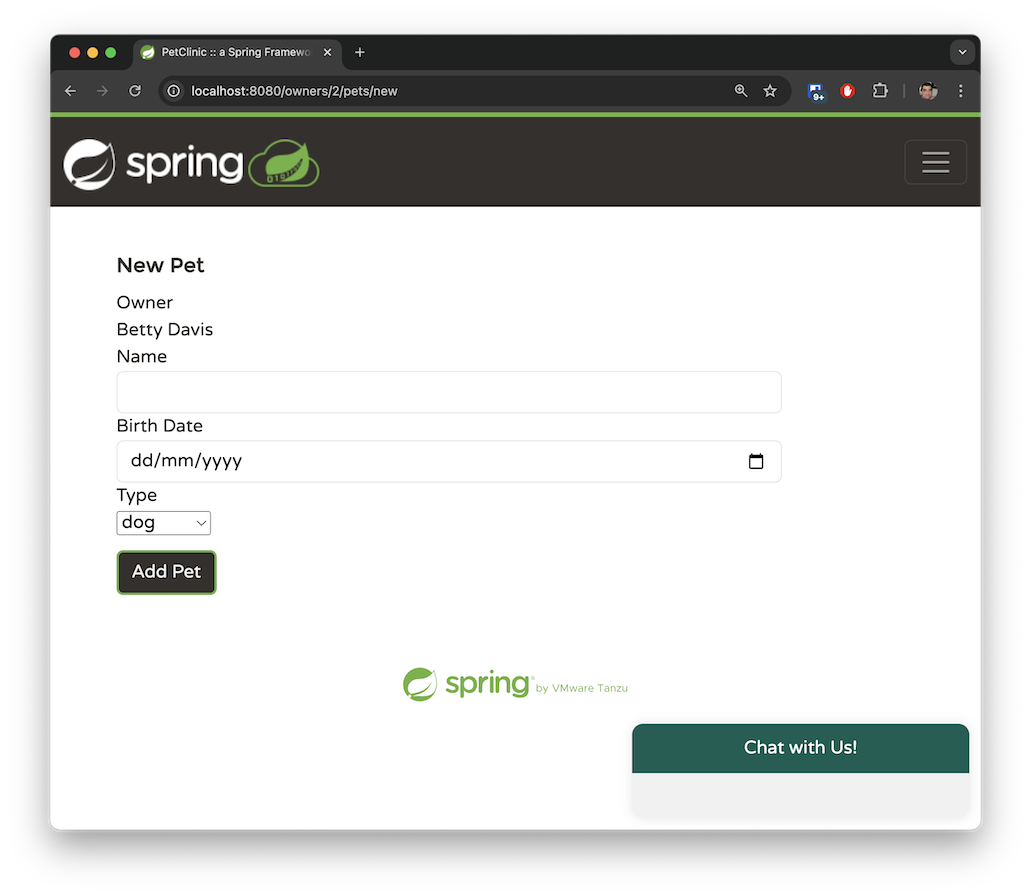
“獸醫”選項卡以分頁檢視顯示可用的獸醫及其專長。目前此選項卡沒有搜尋功能。雖然 Spring Petclinic 的 main 分支只有少數獸醫,但我在 spring-ai 分支中生成了數百個模擬獸醫,以模擬處理大量資料的應用程式。稍後,我們將探討如何使用檢索增強生成 (RAG) 來管理如此龐大的資料集。
這些是我們可以在系統中執行的主要操作。我們已將應用程式對映到其基本功能,並且我們希望 OpenAI 能夠推斷與這些操作相對應的自然語言請求。
在上一節中,我們描述了四種不同的函式。現在,讓我們透過指定特定的 java.util.function.Function bean 將它們對映到我們可以與 Spring AI 一起使用的函式。
以下 java.util.function.Function 負責返回 Spring Petclinic 中的所有者列表:
@Configuration
@Profile("openai")
class AIFunctionConfiguration {

	// The @Description annotation helps the model understand when to call the function
	@Bean
	@Description("List the owners that the pet clinic has")
	public Function<OwnerRequest, OwnersResponse> listOwners(AIDataProvider petclinicAiProvider) {
		return request -> {
			return petclinicAiProvider.getAllOwners();
		};
	}
}
record OwnerRequest(Owner owner) {
};

record OwnersResponse(List<Owner> owners) {
};
我們正在 openai 配置檔案中建立一個 @Configuration 類,並在其中註冊一個標準的 Spring @Bean。
該 bean 必須返回一個 java.util.function.Function。
我們使用 Spring 的 @Description 註解來解釋此函式的作用。值得注意的是,Spring AI 會將此描述傳遞給 LLM,以幫助它確定何時呼叫此特定函式。
該函式接受一個 OwnerRequest 記錄,該記錄持有現有的 Spring Petclinic Owner 實體類。這演示了 Spring AI 如何利用您已在應用程式中開發的元件,而無需完全重寫。
OpenAI 將決定何時呼叫此函式,並傳遞一個表示 OwnerRequest 記錄的 JSON 物件。Spring AI 將自動將此 JSON 轉換為 OwnerRequest 物件並執行該函式。一旦返回響應,Spring AI 將把結果 OwnerResponse 記錄(其中包含 List<Owner>)轉換回 JSON 格式,供 OpenAI 處理。當 OpenAI 收到響應時,它將以自然語言為使用者生成回覆。
該函式呼叫實現實際邏輯的 AIDataProvider @Service bean。在我們的簡單用例中,該函式僅使用 JPA 查詢資料:
  public OwnersResponse getAllOwners() {
	  Pageable pageable = PageRequest.of(0, 100);
	  Page<Owner> ownerPage = ownerRepository.findAll(pageable);
	  return new OwnersResponse(ownerPage.getContent());
  }
Spring Petclinic 的現有遺留程式碼返回分頁資料,以保持響應大小可管理並方便 UI 中分頁檢視的處理。在我們的案例中,我們預計所有者總數相對較少,OpenAI 應該能夠在單個請求中處理此類流量。因此,我們在單個 JPA 請求中返回前 100 個所有者。
您可能認為這種方法並非最優,在實際應用程式中,您是正確的。如果資料量很大,這種方法效率會很低——系統中很可能擁有超過 100 個所有者。對於這種情況,我們需要實現不同的模式,正如我們將在 listVets 函式中探討的那樣。然而,對於我們的演示用例,我們可以假設我們的系統包含少於 100 個所有者。
讓我們使用一個真實的示例,並結合 SimpleLoggerAdvisor 來觀察幕後發生的事情:
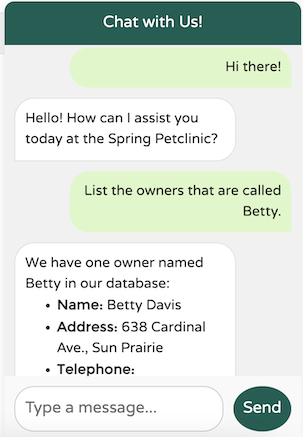
這裡發生了什麼?讓我們檢視 SimpleLoggerAdvisor 日誌的輸出以進行調查:
request:
AdvisedRequest[chatModel=org.springframework.ai.azure.openai.AzureOpenAiChatModel@18e69455,
userText=
"List the owners that are called Betty.",
systemText=You are a friendly AI assistant designed to help with the management of a veterinarian pet clinic called Spring Petclinic.
Your job...
chatOptions=org.springframework.ai.azure.openai.AzureOpenAiChatOptions@3d6f2674,
media=[],
functionNames=[],
functionCallbacks=[],
messages=[UserMessage{content='"Hi there!"',
properties={messageType=USER},
messageType=USER},
AssistantMessage [messageType=ASSISTANT, toolCalls=[],
textContent=Hello! How can I assist you today at Spring Petclinic?,
metadata={choiceIndex=0, finishReason=stop, id=chatcmpl-A99D20Ql0HbrpxYc0LIkWZZLVIAKv,
messageType=ASSISTANT}]],
userParams={}, systemParams={}, advisors=[org.springframework.ai.chat.client.advisor.observation.ObservableRequestResponseAdvisor@1d04fb8f,
org.springframework.ai.chat.client.advisor.observation.ObservableRequestResponseAdvisor@2fab47ce], advisorParams={}]
請求包含有關傳送到 LLM 的有趣資料,包括使用者文字、歷史訊息、表示當前聊天會話的 ID、要觸發的顧問列表以及系統文字。
您可能想知道上面的日誌請求中函式在哪裡。函式未顯式記錄;它們封裝在 AzureOpenAiChatOptions 的內容中。在除錯模式下檢查物件會顯示模型可用的函式列表:
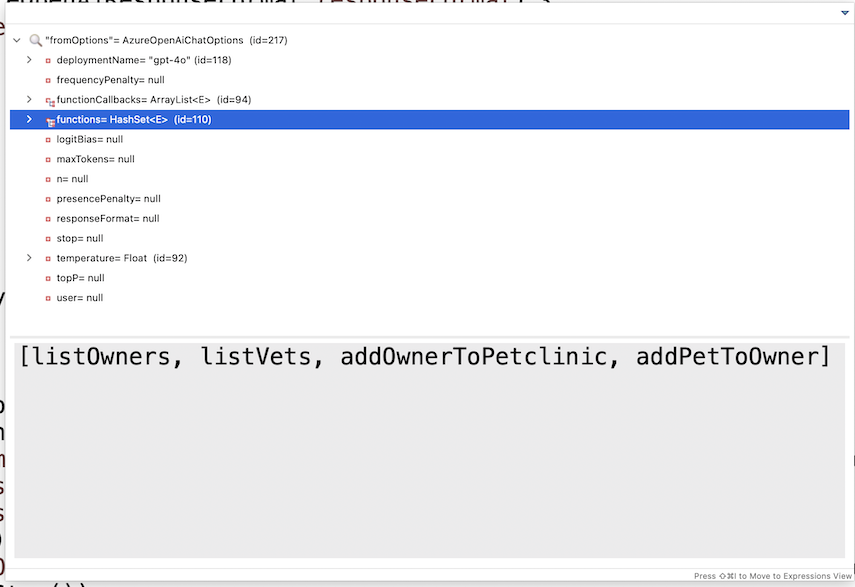
OpenAI 將處理請求,確定它需要所有者列表中的資料,並返回一個 JSON 回覆給 Spring AI,請求 listOwners 函式中的附加資訊。Spring AI 隨後將使用 OpenAI 提供的 OwnersRequest 物件呼叫該函式,並將響應傳送回 OpenAI,保持會話 ID 以協助無狀態連線上的會話連續性。OpenAI 將根據提供的附加資料生成最終響應。讓我們檢視記錄的響應:
response: {
  "result": {
    "metadata": {
      "finishReason": "stop",
      "contentFilterMetadata": {
        "sexual": {
          "severity": "safe",
          "filtered": false
        },
        "violence": {
          "severity": "safe",
          "filtered": false
        },
        "hate": {
          "severity": "safe",
          "filtered": false
        },
        "selfHarm": {
          "severity": "safe",
          "filtered": false
        },
        "profanity": null,
        "customBlocklists": null,
        "error": null,
        "protectedMaterialText": null,
        "protectedMaterialCode": null
      }
    },
    "output": {
      "messageType": "ASSISTANT",
      "metadata": {
        "choiceIndex": 0,
        "finishReason": "stop",
        "id": "chatcmpl-A9oKTs6162OTut1rkSKPH1hE2R08Y",
        "messageType": "ASSISTANT"
      },
      "toolCalls": [],
      "content": "The owner named Betty in our records is:\n\n- **Betty Davis**\n  - **Address:** 638 Cardinal Ave., Sun Prairie\n  - **Telephone:** 608-555-1749\n  - **Pet:** Basil (Hamster), born on 2012-08-06\n\nIf you need any more details or further assistance, please let me know!"
    }
  },
  ...
  ]
}
我們在 content 部分看到了響應本身。返回的 JSON 大部分由元資料組成——例如內容過濾器、正在使用的模型、響應中的聊天 ID 會話、消耗的令牌數量、響應完成方式等等。
這說明了系統如何端到端地執行:它從您的瀏覽器開始,到達 Spring 後端,並涉及 Spring AI 和 LLM 之間的 B2B 乒乓互動,直到響應傳送回發起初始呼叫的 JavaScript。
現在,讓我們回顧其餘三個功能。
addPetToOwner 方法特別有趣,因為它展示了模型函式呼叫的強大功能。
當用戶想要為一個主人新增寵物時,期望他們輸入寵物型別 ID 是不現實的。相反,他們很可能會說這隻寵物是“狗”,而不是簡單地提供一個數字 ID,例如“2”。
為了幫助 LLM 確定正確的寵物型別,我使用了 @Description 註解來提供有關我們要求的提示。由於我們的寵物診所只處理六種寵物型別,因此這種方法是可管理且有效的:
	@Bean
	@Description("Add a pet with the specified petTypeId, " + "to an owner identified by the ownerId. "
			+ "The allowed Pet types IDs are only: " + "1 - cat" + "2 - dog" + "3 - lizard" + "4 - snake" + "5 - bird"
			+ "6 - hamster")
	public Function<AddPetRequest, AddedPetResponse> addPetToOwner(AIDataProvider petclinicAiProvider) {
		return request -> {
			return petclinicAiProvider.addPetToOwner(request);
		};
	}
AddPetRequest 記錄包含自由文字的寵物型別,反映了使用者通常提供的方式,以及完整的 Pet 實體和引用的 ownerId。
record AddPetRequest(Pet pet, String petType, Integer ownerId) {
};
record AddedPetResponse(Owner owner) {
};
這是業務實現:我們透過 ID 檢索所有者,然後將新寵物新增到其現有寵物列表中。
	public AddedPetResponse addPetToOwner(AddPetRequest request) {
		Owner owner = ownerRepository.findById(request.ownerId());
		owner.addPet(request.pet());
		this.ownerRepository.save(owner);
		return new AddedPetResponse(owner);
	}
在為本文除錯流程時,我注意到一個有趣的行為:在某些情況下,請求中的 Pet 實體已預先填充了正確的寵物型別 ID 和名稱。
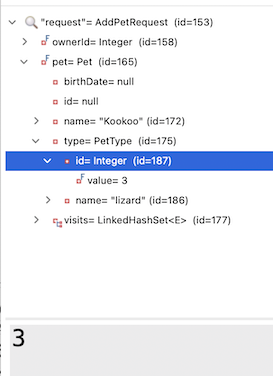
我還注意到我並沒有真正在我的業務實現中使用 petType 字串。Spring AI 是否有可能自己“弄清楚”了 PetType 名稱到正確 ID 的正確對映?
為了測試這一點,我從請求物件中刪除了 petType,並簡化了 @Description:
	@Bean
	@Description("Add a pet with the specified petTypeId, to an owner identified by the ownerId.")
	public Function<AddPetRequest, AddedPetResponse> addPetToOwner(AIDataProvider petclinicAiProvider) {
		return request -> {
			return petclinicAiProvider.addPetToOwner(request);
		};
	}
    record AddPetRequest(Pet pet, Integer ownerId) {
    };
    record AddedPetResponse(Owner owner) {
    };
我發現,在大多數提示中,LLM 竟然能夠自行找出如何執行對映。我最終確實在 PR 中保留了原始描述,因為我注意到一些邊緣情況,LLM 在這些情況下難以理解相關性。
儘管如此,即使是 80% 的用例,這也非常令人印象深刻。正是這些事情讓 Spring AI 和 LLM 幾乎感覺像魔法一樣。Spring AI 和 OpenAI 之間的互動設法理解了 Pet 的 @Entity 中的 PetType 需要將字串“lizard”對映到其在資料庫中的相應 ID 值。這種無縫整合展示了將傳統程式設計與 AI 功能相結合的潛力。
// These are the original insert queries in data.sql
INSERT INTO types VALUES (default, 'cat'); //1
INSERT INTO types VALUES (default, 'dog'); //2
INSERT INTO types VALUES (default, 'lizard'); //3
INSERT INTO types VALUES (default, 'snake'); //4
INSERT INTO types VALUES (default, 'bird'); //5
INSERT INTO types VALUES (default, 'hamster'); //6

@Entity
@Table(name = "pets")
public class Pet extends NamedEntity {

	private static final long serialVersionUID = 622048308893169889L;

	@Column(name = "birth_date")
	@DateTimeFormat(pattern = "yyyy-MM-dd")
	private LocalDate birthDate;

	@ManyToOne
	@JoinColumn(name = "type_id")
	private PetType type;

	@OneToMany(cascade = CascadeType.ALL, fetch = FetchType.EAGER)
	@JoinColumn(name = "pet_id")
	@OrderBy("visit_date ASC")
	private Set<Visit> visits = new LinkedHashSet<>();
即使你在請求中輸入了一些錯別字,它也能正常工作。在下面的例子中,LLM 識別出我將“hamster”拼錯為“hamstr”,糾正了請求,併成功將其與正確的寵物 ID 匹配。
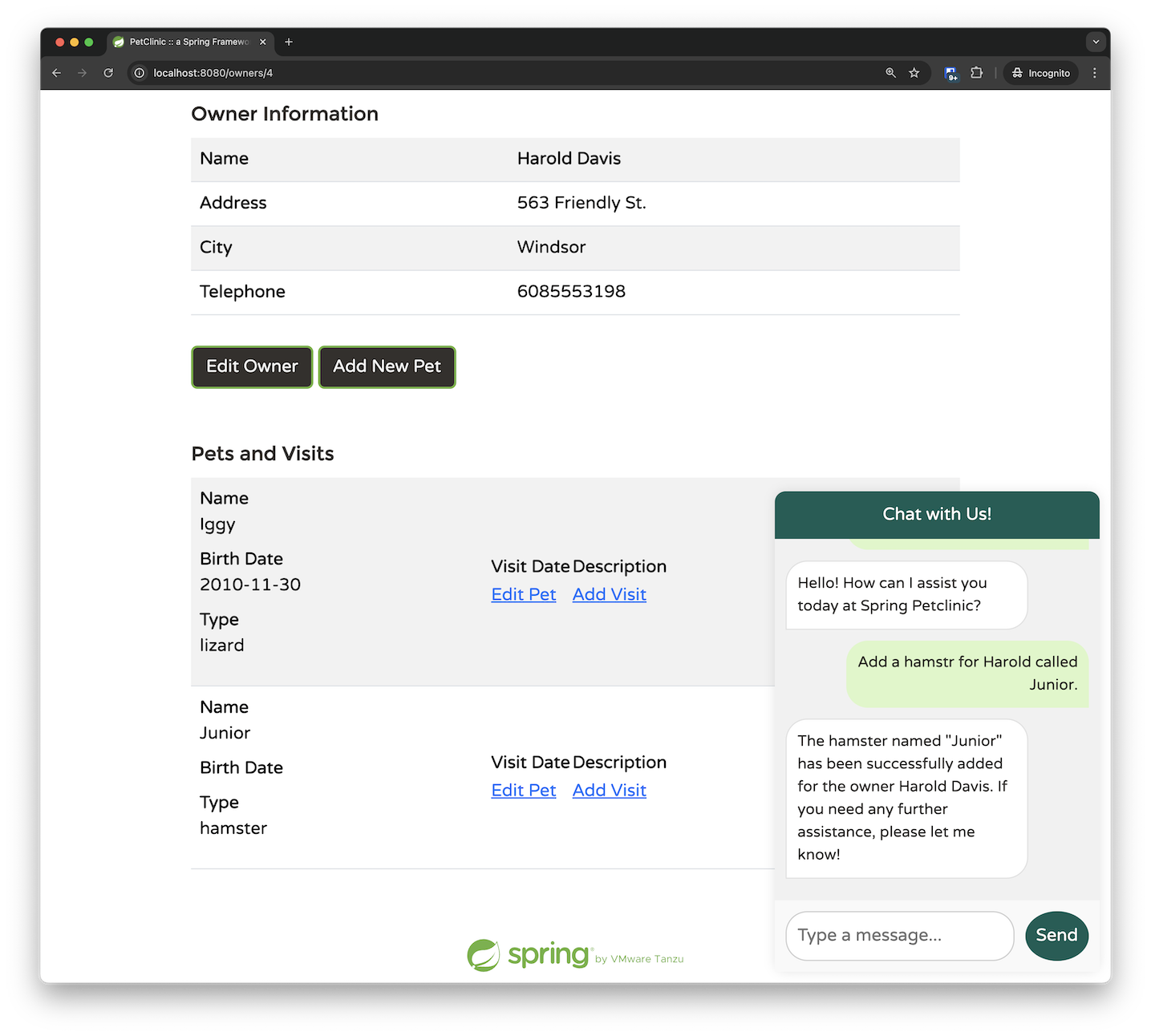
如果你深入挖掘,你會發現事情變得更加令人印象深刻。AddPetRequest 只將 ownerId 作為引數傳遞;我提供了所有者的名字而不是他們的 ID,LLM 竟然自己確定了正確的對映。這表明 LLM 選擇在呼叫 addPetToOwner 函式之前呼叫 listOwners 函式。透過新增一些斷點,我們可以確認這種行為。最初,我們命中了檢索所有者的斷點:

只有在所有者資料返回並處理後,我們才呼叫 addPetToOwner 函式:

我的結論是:使用 Spring AI,從簡單開始。提供您知道所需的基本資料,並使用簡短、簡潔的 bean 描述。Spring AI 和 LLM 很可能會“自行解決”其餘部分。只有在出現問題時,您才應該開始向系統新增更多提示。
addOwner 函式相對簡單。它接受一個所有者並將其新增到系統中。然而,在這個例子中,我們可以看到如何使用我們的聊天助手執行驗證和提出後續問題:
	@Bean
	@Description("Add a new pet owner to the pet clinic. "
			+ "The Owner must include first and last name, "
			+ "an address and a 10-digit phone number")
	public Function<OwnerRequest, OwnerResponse> addOwnerToPetclinic(AIDataProvider petclinicAiDataProvider) {
		return request -> {
			return petclinicAiDataProvider.addOwnerToPetclinic(request);
		};
	}

    record OwnerRequest(Owner owner) {
    };
    record OwnerResponse(Owner owner) {
    };
業務實現很簡單:
	public OwnerResponse addOwnerToPetclinic(OwnerRequest ownerRequest) {
		ownerRepository.save(ownerRequest.owner());
		return new OwnerResponse(ownerRequest.owner());
	}
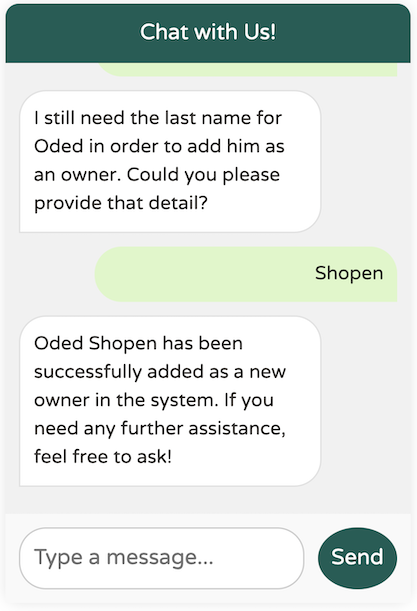
在這裡,我們指導模型,確保 OwnerRequest 中的 Owner 在新增之前符合某些驗證標準。具體來說,所有者必須包含名字、姓氏、地址和 10 位電話號碼。如果缺少任何資訊,模型將提示我們提供必要的詳細資訊,然後才能繼續新增所有者:
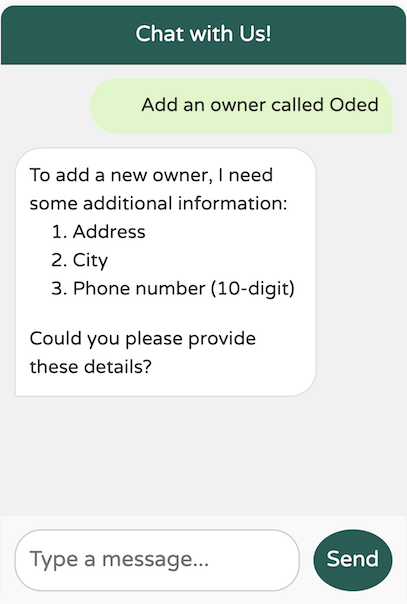
模型沒有在請求必要的額外資料(例如地址、城市和電話號碼)之前建立新所有者。但是,我不記得提供了所需的姓氏。它還會起作用嗎?
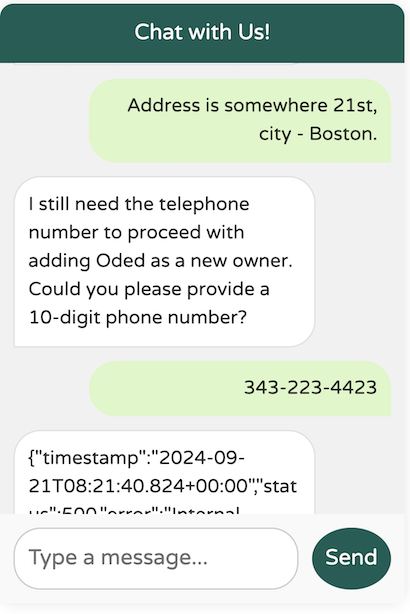
我們已經發現了模型中的一個邊緣情況:它似乎沒有強制要求姓氏,儘管 @Description 指定姓氏是強制性的。我們如何解決這個問題?提示工程來救援!
	@Bean
	@Description("Add a new pet owner to the pet clinic. "
			+ "The Owner must include a first name and a last name as two separate words, "
			+ "plus an address and a 10-digit phone number")
	public Function<OwnerRequest, OwnerResponse> addOwnerToPetclinic(AIDataProvider petclinicAiDataProvider) {
		return request -> {
			return petclinicAiDataProvider.addOwnerToPetclinic(request);
		};
	}
透過在描述中新增“as two separate words”(作為兩個獨立的詞)的提示,模型對我們的期望有了更清晰的理解,從而能夠正確地強制執行姓氏要求。
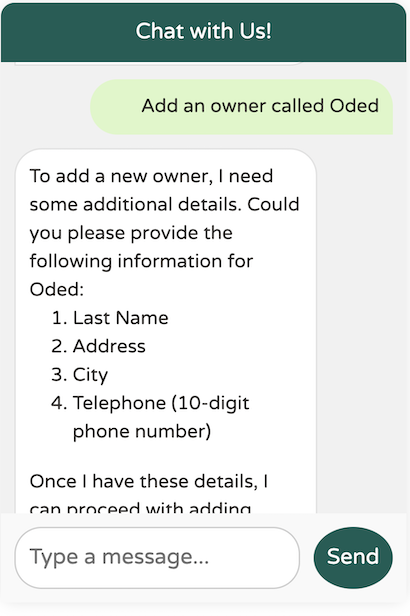
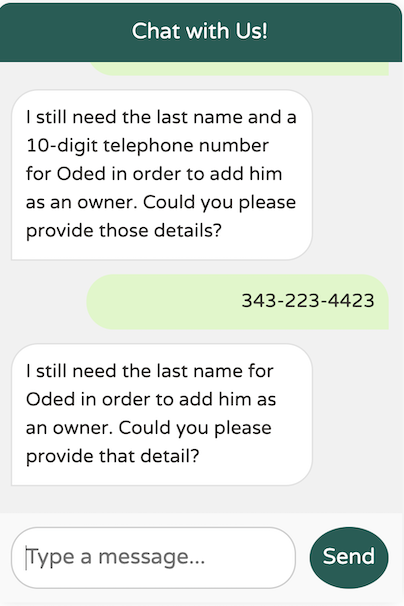
在本文的第一部分,我們探討了如何利用 Spring AI 與大型語言模型協同工作。我們構建了一個自定義的 ChatClient,利用了函式呼叫,並針對我們的特定需求優化了提示工程。
在第二部分中,我們將深入探討檢索增強生成 (RAG) 的強大功能,以將模型與大型的、特定領域的資料集整合,這些資料集過於龐大,無法透過函式呼叫方法進行處理。