
領先一步
VMware 提供培訓和認證,助您加速進步。
瞭解更多這篇博文由我們傑出的貢獻者Thomas Vitale 聯合撰寫。
OpenAI 提供了專門的 `speech-to-text` 和 `text-to-speech` 轉換模型,以其效能和成本效益而聞名。Spring AI 透過語音轉文字和文字轉語音 (TTS) 集成了這些功能。
新的 音訊生成 功能 (gpt-4o-audio-preview) 更進一步,實現了混合輸入和輸出模式。音訊輸入可以包含比純文字更豐富的資料。音訊可以傳達細微的語氣和語調等資訊,並且結合音訊輸出,它能夠實現非同步的 語音轉語音 互動。此外,這種新的多模態能力為結構化資料提取等創新應用開闢了可能性。開發者不僅可以從純文字中提取結構化資訊,還可以從影像和音訊中提取,無縫構建複雜的結構化物件。
Spring AI 的 多模態訊息 API 簡化了將多模態能力與各種 AI 模型整合的工作。
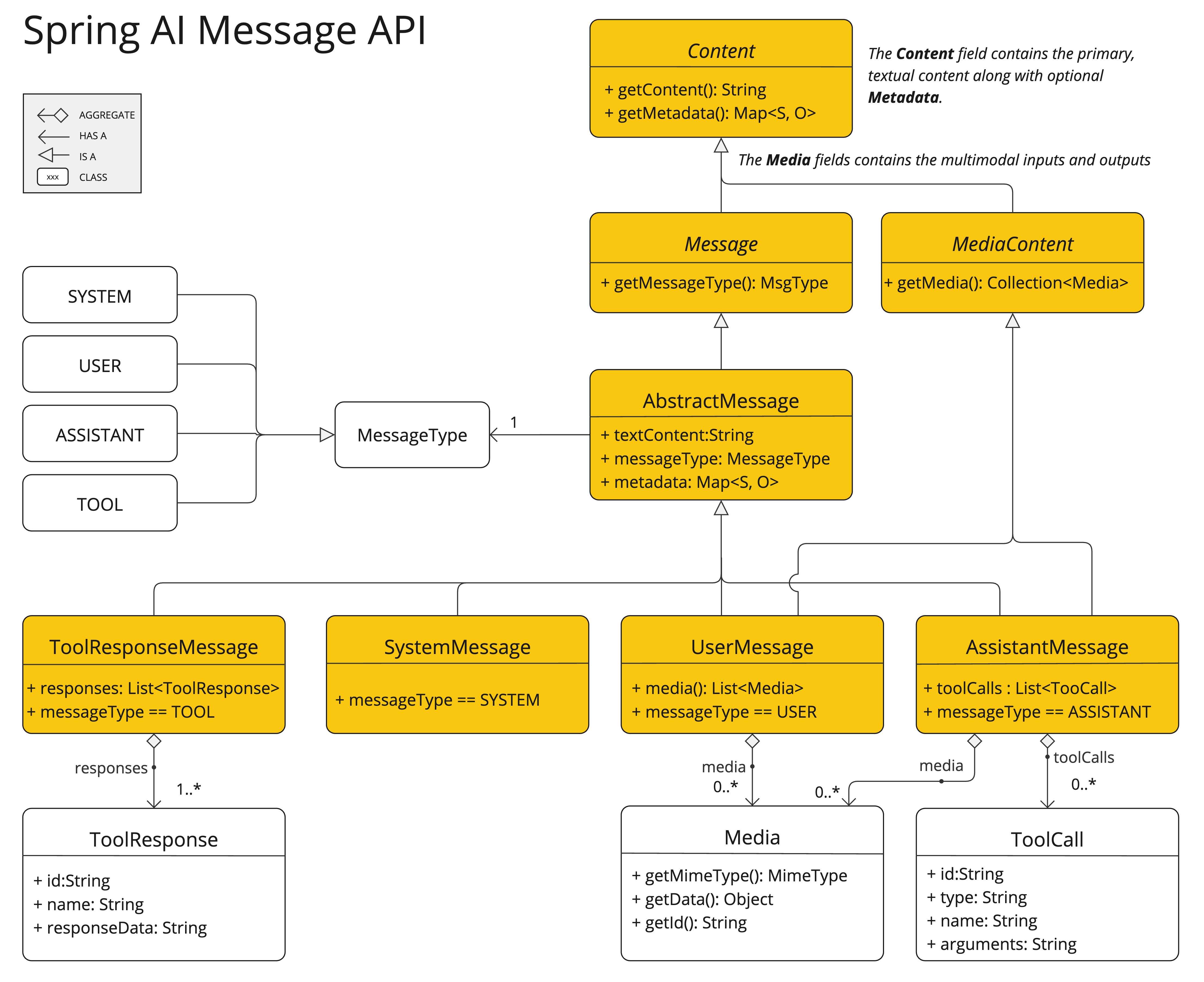
現在,它完全支援 OpenAI 的 音訊輸入 和 音訊輸出 模式,這在很大程度上得益於社群成員 Thomas Vitale 對該功能開發的貢獻。
請遵循 Spring AI-OpenAI 整合文件來準備您的環境。
OpenAI 的 使用者訊息 API 接受訊息中的 base64 編碼音訊檔案,使用 Media 型別。支援的格式包括 audio/mp3 和 audio/wav。
示例:向輸入提示中新增音訊
// Prepare the audio resource
var audioResource = new ClassPathResource("speech1.mp3");

// Create a user message with audio and send it to the chat model
String response = chatClient.prompt()
        .user(u -> u.text("What is this recording about?")
                    .media(MimeTypeUtils.parseMimeType("audio/mp3"), audioResource))
        .options(OpenAiChatOptions.builder()
            .withModel(OpenAiApi.ChatModel.GPT_4_O_AUDIO_PREVIEW).build())
        .call()
        .content();
OpenAI 的 助手訊息 API 可以使用 Media 型別返回 base64 編碼的音訊檔案。
示例:生成音訊輸出
// Generate an audio response
ChatResponse response = chatClient
    .prompt("Tell me a joke about the Spring Framework")
    .options(OpenAiChatOptions.builder()
        .withModel(OpenAiApi.ChatModel.GPT_4_O_AUDIO_PREVIEW)
        .withOutputModalities(List.of("text", "audio"))
        .withOutputAudio(new AudioParameters(Voice.ALLOY, AudioResponseFormat.WAV))
        .build())
    .call()
    .chatResponse();

// Access the audio transcript
String audioTranscript = response.getResult().getOutput().getContent();

// Retrieve the generated audio
byte[] generatedAudio = response.getResult().getOutput().getMedia().get(0).getDataAsByteArray();
要生成音訊輸出,請在 OpenAiChatOptions 中指定音訊模式。使用 AudioParameters 類來自定義語音和音訊格式。
此示例演示瞭如何使用支援輸入和輸出音訊的 Spring AI 構建一個互動式聊天機器人。它展示了 AI 如何透過自然的音訊回覆來增強使用者互動。
新增 Spring AI OpenAI 啟動器
<dependency>
    <groupId>org.springframework.ai</groupId>
    <artifactId>spring-ai-openai-spring-boot-starter</artifactId>
</dependency>
在 application.properties 中配置 API 金鑰、模型名稱和輸出音訊模式
spring.main.web-application-type=none

spring.ai.openai.api-key=${OPENAI_API_KEY}
spring.ai.openai.chat.options.model=gpt-4o-audio-preview

spring.ai.openai.chat.options.output-modalities=text,audio
spring.ai.openai.chat.options.output-audio.voice=ALLOY
spring.ai.openai.chat.options.output-audio.format=WAV
下面詳細介紹的語音聊天機器人的 Java 實現,使用音訊輸入和輸出來建立一個會話式 AI 助手。它利用 Spring AI 與 OpenAI 模型的整合,實現了與使用者的無縫互動。
VoiceAssistantApplication
VoiceAssistantApplication 作為主應用程式。
CommandLineRunner bean 初始化聊天機器人
ChatClient 使用 systemPrompt 進行上下文理解,並使用記憶體中的聊天記錄進行對話歷史記錄。Audio 工具用於錄製使用者的語音輸入,並播放 AI 生成的音訊響應。聊天迴圈: 在迴圈中
audio.startRecording() 和 audio.stopRecording() 方法處理錄製過程,暫停以等待使用者輸入。chatClient.prompt() 將使用者訊息傳送到 AI 模型。音訊資料封裝在 Media 物件中。Audio.play() 方法播放為音訊。有關實現,請參閱以下程式碼片段
@Bean
public CommandLineRunner chatBot(ChatClient.Builder chatClientBuilder,
        @Value("${chatbot.prompt:classpath:/marvin.paranoid.android.txt}") Resource systemPrompt) {
    return args -> {

        var chatClient = chatClientBuilder.defaultSystem(systemPrompt)
            .defaultAdvisors(new MessageChatMemoryAdvisor(new InMemoryChatMemory()))
            .build();

        try (Scanner scanner = new Scanner(System.in)) {

            Audio audio = new Audio();

            while (true) {
                audio.startRecording();
                System.out.print("Recording your question ... press <Enter> to stop! ");
                scanner.nextLine();
                audio.stopRecording();

                System.out.print("PROCESSING ... ");

                AssistantMessage response = chatClient.prompt()
                    .messages(new UserMessage("Please answer the questions in the audio input",
                            new Media(MediaType.parseMediaType("audio/wav"),
                                    new ByteArrayResource(audio.getLastRecording()))))
                    .call()
                    .chatResponse()
                    .getResult()
                    .getOutput();

                System.out.println("ASSISTANT: " + response.getContent());
                Audio.play(response.getMedia().get(0).getDataAsByteArray());
            }
        }
    };
}
用於捕獲和播放音訊的 Audio 工具是一個利用純 Java Sound API 的單一類。
 ▗▄▄▖▗▄▄▖ ▗▄▄▖ ▗▄▄▄▖▗▖  ▗▖ ▗▄▄▖     ▗▄▖ ▗▄▄▄▖
▐▌   ▐▌ ▐▌▐▌ ▐▌  █  ▐▛▚▖▐▌▐▌       ▐▌ ▐▌  █
 ▝▀▚▖▐▛▀▘ ▐▛▀▚▖  █  ▐▌ ▝▜▌▐▌▝▜▌    ▐▛▀▜▌  █
▗▄▄▞▘▐▌   ▐▌ ▐▌▗▄█▄▖▐▌  ▐▌▝▚▄▞▘    ▐▌ ▐▌▗▄█▄▖
▗▄▄▖  ▗▄▖ ▗▄▄▖  ▗▄▖ ▗▖  ▗▖ ▗▄▖ ▗▄▄▄▖▗▄▄▄      ▗▄▖ ▗▖  ▗▖▗▄▄▄ ▗▄▄▖  ▗▄▖ ▗▄▄▄▖▗▄▄▄
▐▌ ▐▌▐▌ ▐▌▐▌ ▐▌▐▌ ▐▌▐▛▚▖▐▌▐▌ ▐▌  █  ▐▌  █    ▐▌ ▐▌▐▛▚▖▐▌▐▌  █▐▌ ▐▌▐▌ ▐▌  █  ▐▌  █
▐▛▀▘ ▐▛▀▜▌▐▛▀▚▖▐▛▀▜▌▐▌ ▝▜▌▐▌ ▐▌  █  ▐▌  █    ▐▛▀▜▌▐▌ ▝▜▌▐▌  █▐▛▀▚▖▐▌ ▐▌  █  ▐▌  █
▐▌   ▐▌ ▐▌▐▌ ▐▌▐▌ ▐▌▐▌  ▐▌▝▚▄▞▘▗▄█▄▖▐▙▄▄▀    ▐▌ ▐▌▐▌  ▐▌▐▙▄▄▀▐▌ ▐▌▝▚▄▞▘▗▄█▄▖▐▙▄▄▀

2024-12-01T11:00:11.274+01:00  INFO 31297 --- [voice-assistant-chatbot] [           main] s.a.d.a.m.VoiceAssistantApplication      : Started VoiceAssistantApplication in 0.827 seconds (process running for 1.054)

Recording your question ... press <Enter> to stop!
完整的演示可在 GitHub 上找到:voice-assistant-chatbot
modalities = ["text", "audio"]。gpt-4o-audio-preview 模型為動態音訊互動解鎖了新的可能性,使開發者能夠構建豐富的、由 AI 驅動的音訊應用程式。
免責宣告:API 功能和特性可能會發生變化。請參考最新的 OpenAI 和 Spring AI 文件以獲取更新。