
領先一步
VMware 提供培訓和認證,助您加速進步。
瞭解更多Spring Security 5 的主要功能之一是支援編寫與透過 OAuth 2 保護的服務整合的應用程式。這包括透過外部服務(如 Facebook 或 GitHub)登入應用程式的功能。
但是,只需少量額外程式碼,您還可以獲取 OAuth 2 訪問令牌,該令牌可用於對服務 API 執行授權請求。
在本文中,我們將探討如何使用 Spring Security 5 開發一個與 Facebook 整合的 Spring Boot 應用程式。您可以在 https://github.com/habuma/facebook-security5 找到本文的完整程式碼。
假設您希望應用程式的使用者能夠使用 Facebook 登入。使用 Spring Security 5,這變得異常簡單。您只需將 Spring Security 的 OAuth 2 客戶端支援新增到專案的構建中,然後配置應用程式的 Facebook 憑據即可。
首先,將 Spring Security OAuth 2 客戶端庫以及 Spring Security 啟動器依賴項新增到 Spring Boot 專案的構建中
<dependency>
  <groupId>org.springframework.boot</groupId>
  <artifactId>spring-boot-starter-security</artifactId>
</dependency>
<dependency>
  <groupId>org.springframework.security</groupId>
  <artifactId>spring-security-oauth2-client</artifactId>
</dependency>
然後,您需要配置應用程式的客戶端 ID 和客戶端金鑰(您可以透過在 https://developers.facebook.com/ 上註冊應用程式來獲取)。所有 OAuth 2 客戶端的屬性都以 spring.security.oauth2.client.registration 為字首。對於 Facebook,您將在此字首下新增 facebook.client-id 和 facebook-client-secret 屬性。在專案的 application.yml 檔案中,它看起來會像這樣
spring:
  security:
    oauth2:
      client:
        registration:
          facebook:
            client-id: YOUR CLIENT ID GOES HERE
            client-secret: YOUR CLIENT SECRET GOES HERE
您也可以將這些屬性設定為環境變數、屬性檔案或 Spring Boot 支援的任何屬性源。當然,您會用自己應用程式的客戶端 ID 和金鑰替換上面 YAML 中顯示的佔位符文字。
有了 OAuth 2 客戶端依賴項和這些屬性設定後,您的應用程式現在將透過 Facebook 提供身份驗證。當您嘗試訪問一個尚未經過身份驗證的頁面時,您會看到一個類似於以下頁面
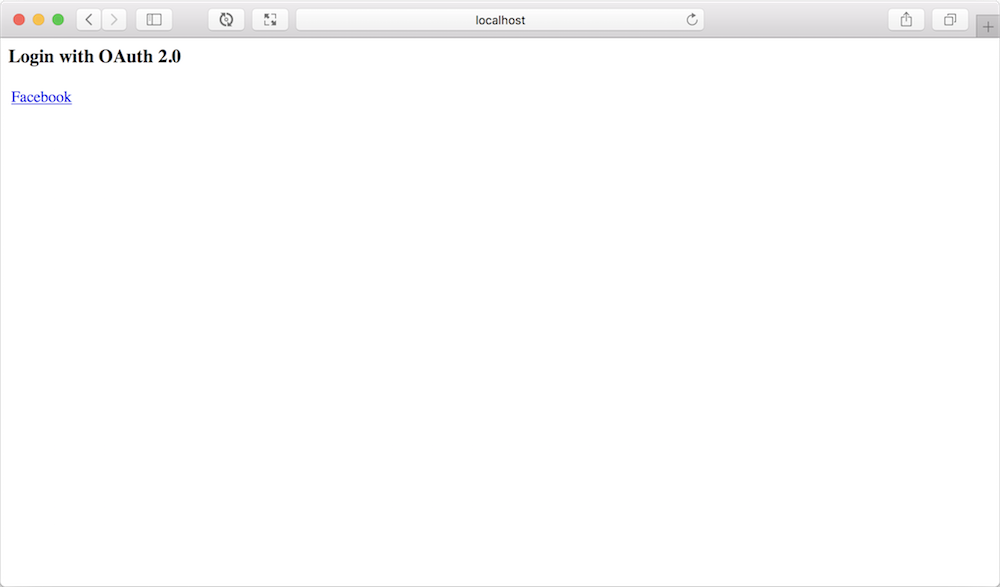
此頁面為您提供了使用任何已配置的 OAuth 2 客戶端登入的機會。出於我們的目的,Facebook 是唯一的選項。
點選 Facebook 連結後,您將被重定向到 Facebook。如果您尚未登入 Facebook,系統會提示您登入。登入後,並假設您尚未授權此應用程式,您將看到一個授權提示,它看起來會像這樣
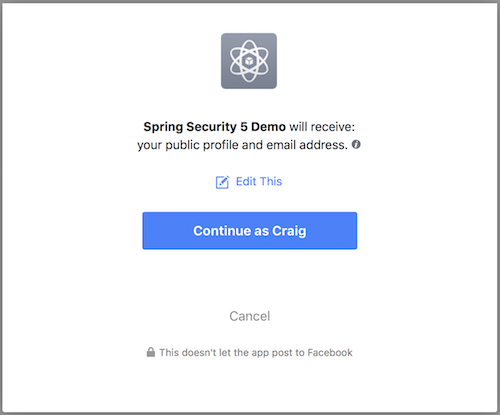
如果您選擇繼續(透過點選“繼續”按鈕),您將被重定向回您的應用程式並完成身份驗證。(如果您選擇“取消”,您也將被重定向回應用程式,但不會成功透過身份驗證。)
使用像 Facebook 這樣的外部服務進行身份驗證是傳統應用程式登入的一個不錯的替代方案。但這只是故事的一半。一旦使用者登入,您還可以使用該身份驗證來訪問遠端服務 API 上的資源。
成功透過外部 OAuth 2 服務進行身份驗證後,安全上下文中儲存的 Authentication 物件實際上是 OAuth2AuthenticationToken,它在 OAuth2AuthorizedClientService 的幫助下,可以為我們提供一個訪問令牌,用於向服務 API 發出請求。
Authentication 可以透過多種方式獲取,包括透過 SecurityContextHolder。一旦您有了 Authentication,就可以將其轉換為 OAuth2AuthenticationToken。
Authentication authentication =
    SecurityContextHolder
        .getContext()
        .getAuthentication();

OAuth2AuthenticationToken oauthToken =
    (OAuth2AuthenticationToken) authentication;
Spring 應用程式上下文中將自動配置一個 OAuth2AuthorizedClientService 作為 bean,因此您只需將其注入到您將使用它的任何地方。
OAuth2AuthorizedClient client =
    clientService.loadAuthorizedClient(
            oauthToken.getAuthorizedClientRegistrationId(),
            oauthToken.getName());

String accessToken = client.getAccessToken().getTokenValue();
呼叫 loadAuthorizedClient() 時會提供客戶端的註冊 ID,這是客戶端憑據在配置中註冊的方式——在我們的例子中是“facebook”。第二個引數是使用者的使用者名稱。本質上,我們要求客戶端服務載入給定使用者和給定服務的 OAuth2AuthorizedClient。獲得 OAuth2AuthorizedClient 後,透過呼叫 getAccessToken().getTokenValue() 獲取訪問令牌值就變得很簡單。
我們可以應用此技術來充實服務的客戶端 API 繫結。首先,我們將建立一個基礎 API 繫結類來處理確保在所有請求中包含訪問令牌的基本任務
public abstract class ApiBinding {

  protected RestTemplate restTemplate;

  public ApiBinding(String accessToken) {
    this.restTemplate = new RestTemplate();
    if (accessToken != null) {
      this.restTemplate.getInterceptors()
          .add(getBearerTokenInterceptor(accessToken));
    } else {
      this.restTemplate.getInterceptors().add(getNoTokenInterceptor());
    }
  }

  private ClientHttpRequestInterceptor
              getBearerTokenInterceptor(String accessToken) {
    ClientHttpRequestInterceptor interceptor =
                new ClientHttpRequestInterceptor() {
      @Override
      public ClientHttpResponse intercept(HttpRequest request, byte[] bytes,
                  ClientHttpRequestExecution execution) throws IOException {
        request.getHeaders().add("Authorization", "Bearer " + accessToken);
        return execution.execute(request, bytes);
      }
    };
    return interceptor;
  }

  private ClientHttpRequestInterceptor getNoTokenInterceptor() {
    return new ClientHttpRequestInterceptor() {
      @Override
      public ClientHttpResponse intercept(HttpRequest request, byte[] bytes,
                  ClientHttpRequestExecution execution) throws IOException {
        throw new IllegalStateException(
                "Can't access the API without an access token");
      }
    };
  }

}
ApiBinding 類最重要的部分是 getBearerTokenInterceptor() 方法,在該方法中為 RestTemplate 建立了一個請求攔截器,以確保在所有對 API 的請求中都包含給定的訪問令牌。但是,如果給定的訪問令牌為 null,則特殊的請求攔截器將丟擲 IllegalStateException,甚至不會嘗試進行 API 請求。對於大多數需要所有請求都經過授權的 API 來說,這是可以接受甚至值得的行為。
現在我們可以基於 ApiBinding 基類編寫 Facebook API 繫結
public class Facebook extends ApiBinding {

  private static final String GRAPH_API_BASE_URL =
              "https://graph.facebook.com/v2.12";

  public Facebook(String accessToken) {
    super(accessToken);
  }

  public Profile getProfile() {
    return restTemplate.getForObject(
            GRAPH_API_BASE_URL + "/me", Profile.class);
  }

  public List<Post> getFeed() {
    return restTemplate.getForObject(
            GRAPH_API_BASE_URL + "/me/feed", Feed.class).getData();
  }

}
如您所見,Facebook 類相當簡單。所有 OAuth 2 的具體細節都包含在 ApiBinding 中,因此這個類可以專注於發出請求以支援應用程式所需的操作。
現在我們只需要配置一個 Facebook bean。該 bean 將是請求範圍的,以允許根據使用者 Authentication 中的訪問令牌建立例項
@Configuration
public class SocialConfig {

  @Bean
  @RequestScope
  public Facebook facebook(OAuth2AuthorizedClientService clientService) {
    Authentication authentication =
            SecurityContextHolder.getContext().getAuthentication();
    String accessToken = null;
    if (authentication.getClass()
            .isAssignableFrom(OAuth2AuthenticationToken.class)) {
      OAuth2AuthenticationToken oauthToken =
              (OAuth2AuthenticationToken) authentication;
      String clientRegistrationId =
              oauthToken.getAuthorizedClientRegistrationId();
      if (clientRegistrationId.equals("facebook")) {
        OAuth2AuthorizedClient client = clientService.loadAuthorizedClient(
                    clientRegistrationId, oauthToken.getName());
        accessToken = client.getAccessToken().getTokenValue();
      }
    }
    return new Facebook(accessToken);
  }

}
此外,由於 Facebook API 繫結中的 getFeed() 方法從使用者訂閱源中獲取資料,因此在驗證使用者時,我們需要將 spring.security.oauth2.client.registration.facebook.scope 設定為指定“user_posts”範圍
spring:
  security:
    oauth2:
      client:
        registration:
          facebook:
            client-id: YOUR CLIENT ID GOES HERE
            client-secret: YOUR CLIENT SECRET GOES HERE
            scope: user_posts
您可能想知道這與 Spring Social 有何關係,Spring Social 也支援使用外部服務登入以及為 Facebook 提供 API 繫結。
Spring Social 透過 ProviderSignInController 和 SocialAuthenticationFilter 提供登入支援。這兩個實現都利用 ConnectionFactory 為外部服務提供 ServiceProvider。Spring Social 的每個 API 繫結都必須提供 ConnectionFactory 和 ServiceProvider 的 API 特定實現。這限制了 Spring Social 只能支援使用那些已提供 ConnectionFactory 和 ServiceProvider 實現的服務進行登入。
相比之下,Spring Security 5 能夠透過在配置中簡單地提供服務詳細資訊來支援使用幾乎任何 OAuth 2 或 OpenID Connect 服務進行登入。Spring Security 5 開箱即用地為 Facebook、Google、GitHub 和 Okta 提供了基線配置(您只需指定客戶端 ID 和金鑰)。但是,如果您必須與另一個服務整合,則只需在應用程式配置中指定服務的詳細資訊(例如授權 URL)。
至於 API 繫結,Spring Social 的 API 繫結非常龐大,涵蓋了它們所針對的 API 提供的大部分功能。但實際上,大多數應用程式只需要 Spring Social 支援的操作的一小部分。如果您只需要獲取使用者的訂閱源,為什麼必須使用一個提供數百個其他操作的龐大 API 繫結呢?同樣,如果您只關心帖子響應的一兩個屬性,為什麼還要處理一個全面涵蓋 Facebook Graph API 所提供內容的 Post 物件呢?在許多這樣的情況下,編寫一個針對您應用程式需求量身定製的 API 繫結可能更容易。
此外,Spring Social 的 API 繫結都使用了底層 RestTemplate。如果您更喜歡使用非阻塞響應式 API 繫結,那您就沒轍了。將 API 繫結改造為基於 WebClient 並非易事,並且實際上會使這些 API 繫結的維護工作量增加一倍。
但是,如果您開發了自己的 API 繫結,那麼將 RestTemplate 替換為響應式 WebClient 就足夠簡單了,如這裡的 ReactiveApiBinding 所示
public abstract class ReactiveApiBinding {
  protected WebClient webClient;

  public ReactiveApiBinding(String accessToken) {
    Builder builder = WebClient.builder();
    if (accessToken != null) {
      builder.defaultHeader("Authorization", "Bearer " + accessToken);
    } else {
      builder.exchangeFunction(
          request -> {
            throw new IllegalStateException(
                    "Can't access the API without an access token");
          });
    }
    this.webClient = builder.build();
  }
}
您甚至可以在同一個 API 繫結中混合使用 WebClient 和 RestTemplate,在需要時應用非阻塞的 WebClient,在同步請求足夠時應用 RestTemplate。
Spring Security 5 對 OAuth 2 的客戶端支援提供了透過外部服務登入的能力,以及使用從身份驗證獲得的令牌來消費該服務 API 的能力。這只是協調 Spring OAuth 故事的第一步,該故事目前分散在 Spring Social 和 Spring Security OAuth 等多個專案中。
Spring Security 的未來版本將繼續改進 OAuth 2 客戶端支援,並採取措施協調 Spring 在 OAuth 安全伺服器端的故事。事實上,Spring Security 5.1.0 目前正在進行的工作旨在使 API 操作更加簡單,有效消除本文中顯示的 ApiBinding 類和 Facebook bean 配置中的大部分管道程式碼。敬請關注!