
領先一步
VMware 提供培訓和認證,助您加速進步。
瞭解更多Spring Integration 2.0 Milestone 3 中引入的 UDP 和 TCP 通道介面卡可在兩個或多個 Spring Integration 應用程式之間,或者在 Spring Integration 應用程式與其他平臺之間提供輕量級通訊。
繼 Oleg 關於貸款經紀人的部落格 之後,我將使用相同的示例來演示如何使用 M3 中新提供的 UDP 介面卡。假設貸款經紀公司執行長收到了一些客戶關於多家銀行報價過高的投訴。他要求資訊長能否在一段時間內監控從各銀行返回的報價。
由於貸款經紀應用程式是使用 Spring Integration 構建的,因此很容易進行竊聽報價、過濾報價,並使用 M3 中的新 IP 介面卡將它們傳送到應用程式外部。這可以透過最少的重新配置來完成;下圖顯示瞭如何使用多播將高報價傳送到簡單的 Spring Roo 應用程式以及 Groovy 和 Perl 指令碼,或者任何支援 IP 的平臺。
首先,讓我們顯式新增聚合通道並竊聽報價...
<int:channel id="quotesAggregationChannel">
    <int:interceptors>
        <int:wire-tap channel="loanSharkDetectorChannel"/>
    </int:interceptors>
</int:channel>
這會將每個報價傳送到 loanSharkDetectorChannel(以及聚合器)。
下一步是設定過濾器和通道來檢測貸款鯊魚...
<int:channel id="loanSharkDetectorChannel" />

<int:filter id="loanSharkFilter"
        input-channel="loanSharkDetectorChannel"
        output-channel="loanSharkChannel"
        expression="payload.rate > 5.2"/>

<int:channel id="loanSharkChannel" />

<int:transformer ref="udpTransformer"
        input-channel="loanSharkChannel"
        output-channel="sharkOutChannel"/>

<int:channel id="sharkOutChannel" />
過濾器丟棄非貸款鯊魚(報價 <= 5.2% 的);轉換器 僅將 LoanQuote 轉換為包含銀行名稱和費率的字串,並用逗號分隔。
最後,我們新增 UDP 通道介面卡;選擇多播以便我們可以將報價傳送到多個目的地...
	<int-ip:outbound-channel-adapter id="udpOut"
		channel="sharkOutChannel"
		protocol="udp"
		host="225.6.7.8"
		multicast="true"
		port="11111"/>
此介面卡會將資料多播到埠 11111 上的多播地址 225.6.7.8。
現在讓我們看看接收端。首先,我建立了一個帶有以下指令碼的簡單 Roo 應用程式...
project --topLevelPackage com.springframework.integration.loanbroker.loanshark
persistence setup --provider HIBERNATE --database HYPERSONIC_IN_MEMORY
entity --class ~.domain.LoanShark
field string --fieldName name
field number --type java.lang.Long --fieldName counter
field number --type java.lang.Double --fieldName averageRate
finder add --finderName findLoanSharksByName
controller scaffold --class ~.web.SharkController
logging setup --level DEBUG
dependency add --artifactId org.springframework.integration.ip --groupId org.springframework.integration --version 2.0.0.M3
perform eclipse
(注意,在發出 perform eclipse 命令之前,我已將 pom.xml 中的 Spring 版本更改為 3.0.1.RELEASE-A)。
有關這些步驟如何生成初始 Roo 應用程式,請參閱 Roo 文件。
最後,我向 Roo 應用程式添加了一些 Spring Integration。
	<int-ip:inbound-channel-adapter id="udpIn"
		channel="channel"
		multicast="true"
		protocol="udp"
		multicast-address="225.6.7.8"
		port="11111"/>

	<int:channel id="channel" />
	<int:transformer ref="transformer"
		input-channel="channel"
		output-channel="transformedChannel"/>
	<int:channel id="transformedChannel" />
	<int:service-activator
		id="activator"
		input-channel="transformedChannel"
		ref="accumulator" />

	<bean id="accumulator" class="com.springframework.integration.loanbroker.loanshark.biz.Accumulator" />
	<bean id="transformer" class="com.springframework.integration.loanbroker.loanshark.biz.SharkTransformer" />
通道介面卡接收資料包([銀行名稱],[費率]);轉換器 將資料轉換為 SharkQuote 物件,然後將其傳遞給 累加器。累加器會查詢銀行,如果需要則建立它,增加計數器並計算該銀行的平均費率。
這是 Roo 應用程式的螢幕截圖;單擊檢視大圖。

此 Groovy 指令碼也接收資料包...
socket = new MulticastSocket(11111)
mcast = InetAddress.getByName("225.6.7.8")
socket.joinGroup(mcast)
buffer = (' ' * 1024) as byte[]
while(true) {
    incoming = new DatagramPacket(buffer, buffer.length)
    socket.receive(incoming)
    s = new String(incoming.data, 0, incoming.length)
    println ("**Shark** " + s)
}
...此 Perl 指令碼也是如此...
#!/usr/bin/perl -w
use strict;
use IO::Socket::Multicast;
my $socket = IO::Socket::Multicast->new(LocalPort=>11111, ReuseAddr=>1)
  or die "Can't start UDP server: $@";
$socket->mcast_add('225.6.7.8');
my ($datagram,$flags);
while ($socket->recv($datagram,1024,$flags)) {
	print "**Shark** $datagram\n";
}
$socket->close();
您可能需要安裝 IO::Socket::Multicast 才能使此指令碼正常工作。
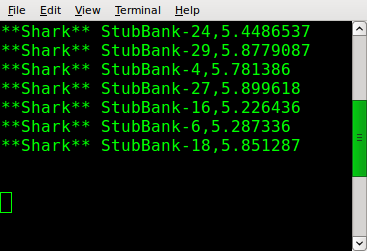
上述任一指令碼都會產生此輸出...
結論
這只是對新 IP 介面卡的一個簡要介紹。程式碼(貸款經紀人和貸款鯊魚 Roo 應用程式的更新)可在 svn 中找到。
https://src.springsource.org/svn/spring-integration/trunk/spring-integration-samples/loan-broker/
https://src.springsource.org/svn/spring-integration/trunk/spring-integration-samples/loanshark/
M3 中也提供了 TCP 介面卡;在此 處 閱讀相關內容。
我們正在考慮建立 TCP/IP 閘道器以實現雙向通訊。如果您需要此功能,請為 JIRA 問題 投票。