
領先一步
VMware 提供培訓和認證,助您加速進步。
瞭解更多在早先的一篇博文中,我介紹了我們為 Spring @MVC 3.0 版本新增的 REST 功能。後來,Alef 撰文介紹瞭如何使用引入的功能為 Pet Clinic 應用程式新增 Atom 檢視。在這篇博文中,我想介紹我們在里程碑 2 中新增的客戶端功能。
模板的主要入口點以六個主要的 HTTP 方法命名
這些方法的名稱清楚地表明瞭它們呼叫的 HTTP 方法,而名稱的第二部分則表示返回的內容。例如,getForObject()將執行 GET 請求,將 HTTP 響應轉換為您選擇的物件型別,並返回該物件。postForLocation將執行POST請求,把給定物件轉換為HTTP請求,並返回新建立物件所在的響應HTTP Location頭。如您所見,這些方法試圖強制執行REST最佳實踐。
每個方法都以URI作為第一個引數。該URI可以是URI模板,並且可以使用變數將模板擴充套件為普通URI。模板變數可以透過兩種形式傳遞:作為String變數引數陣列,或作為Map<String, String>。字串可變引數變體按順序展開給定的模板變數,因此
String result = restTemplate.getForObject("http://example.com/hotels/{hotel}/bookings/{booking}", String.class, "42", "21");
將對以下地址執行GET請求http://example.com/hotels/42/bookings/21。Map變體根據變數名展開模板,因此在使用許多變數或單個變數多次使用時更有用。例如
Map<String, String> vars = new HashMap<String, String>();
vars.put("hotel", "42");
vars.put("booking", "21");
String result = restTemplate.getForObject("http://example.com/hotels/{hotel}/bookings/{booking}", String.class, vars);
也將對以下地址執行GET請求http://example.com/hotels/42/rooms/42.
<photos page="2" pages="89" perpage="10" total="881">
	<photo id="2636" owner="47058503995@N01"
		secret="a123456" server="2" title="test_04"
		ispublic="1" isfriend="0" isfamily="0" />
	<photo id="2635" owner="47058503995@N01"
		secret="b123456" server="2" title="test_03"
		ispublic="0" isfriend="1" isfamily="1" />
	<photo id="2633" owner="47058503995@N01"
		secret="c123456" server="2" title="test_01"
		ispublic="1" isfriend="0" isfamily="0" />
	<photo id="2610" owner="12037949754@N01"
		secret="d123456" server="2" title="00_tall"
		ispublic="1" isfriend="0" isfamily="0" />
</photos>
使用RestTemplate,檢索這樣的文件非常簡單
final String photoSearchUrl =
   "http://www.flickr.com/services/rest?method=flickr.photos.search&api+key={api-key}&tags={tag}&per_page=10";
Source photos = restTemplate.getForObject(photoSearchUrl, Source.class, apiKey, searchTerm);
其中apiKey還是searchTerm是命令列上給定的兩個字串。此方法使用SourceHttpMessageConverter將HTTP XML響應轉換為javax.xml.transform.Source(請注意,SourceHttpMessageConverter是在我們釋出Spring 3.0 M2後不久引入的,因此您需要獲取最新的快照(或即將釋出的M3)才能使用它。下面的示例專案已設定為透過Maven檢索這些)。
List<BufferedImage> imageList = xpathTemplate.evaluate("//photo", photos, new NodeMapper() {
    public Object mapNode(Node node, int i) throws DOMException {
        Element photo = (Element) node;

        Map<String, String> variables = new HashMap<String, String>(3);
        variables.put("server", photo.getAttribute("server"));
        variables.put("id", photo.getAttribute("id"));
        variables.put("secret", photo.getAttribute("secret"));

        String photoUrl = "http://static.flickr.com/{server}/{id}_{secret}_m.jpg";
        return restTemplate.getForObject(photoUrl, BufferedImage.class, variables);
    }
});
例如,給定上面給出的XML文件,imageList將包含4張影像。檢索到的第一張影像的URL將是http://static.flickr.com/2/2636_ a123456_m.jpg,第二張是http://static.flickr.com/2/2635_ b123456_m.jpg,等等。
public class BufferedImageHttpMessageConverter implements HttpMessageConverter<BufferedImage> {

    public List<MediaType> getSupportedMediaTypes() {
        return Collections.singletonList(new MediaType("image", "jpeg"));
    }

    public boolean supports(Class<? extends BufferedImage> clazz) {
        return BufferedImage.class.equals(clazz);
    }

    public BufferedImage read(Class<BufferedImage> clazz, HttpInputMessage inputMessage) throws IOException {
        return ImageIO.read(inputMessage.getBody());
    }

    public void write(BufferedImage image, HttpOutputMessage message) throws IOException {
        throw new UnsupportedOperationException("Not implemented");
    }

}
請注意,我們沒有實現write(),因為我們不是上傳影像,只是下載它們。現在我們只需將此轉換器插入RestTemplate。我們在Spring應用程式上下文中完成此操作
<beans xmlns="http://www.springframework.org/schema/beans"
       xmlns:xsi="http://www.w3.org/2001/XMLSchema-instance"
       xsi:schemaLocation="http://www.springframework.org/schema/beans http://www.springframework.org/schema/beans/spring-beans.xsd">

    <bean id="flickrClient" class="com.springsource.samples.resttemplate.FlickrClient">
        <constructor-arg ref="restTemplate"/>
        <constructor-arg ref="xpathTemplate"/>
    </bean>

    <bean id="restTemplate" class="org.springframework.web.client.RestTemplate">
        <property name="messageConverters">
            <list>
                <bean class="org.springframework.http.converter.xml.SourceHttpMessageConverter"/>
                <bean class="com.springsource.samples.resttemplate.BufferedImageHttpMessageConverter"/>
            </list>
        </property>
    </bean>

    <bean id="xpathTemplate" class="org.springframework.xml.xpath.Jaxp13XPathTemplate"/>

</beans>
JFrame frame = new JFrame(searchTerm + " photos");
frame.setLayout(new GridLayout(2, imageList.size() / 2));
for (BufferedImage image : imageList) {
    frame.add(new JLabel(new ImageIcon(image)));
}
frame.setDefaultCloseOperation(JFrame.EXIT_ON_CLOSE);
frame.pack();
frame.setVisible(true);
,它給我們帶來了以下內容
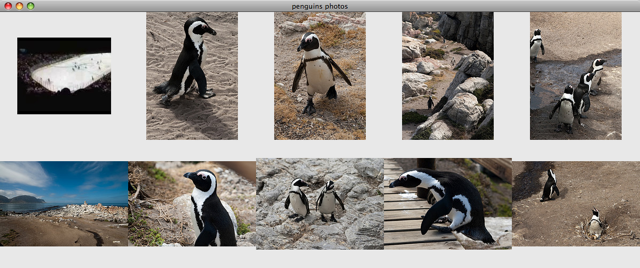
總的來說,我希望這篇文章向您展示了使用RestTemplate與HTTP伺服器互動是多麼簡單。在不到30行Java程式碼中,我們建立了一個GUI,顯示了每個人最喜歡的鳥:企鵝!檢視RestTemplate並告訴我們您的想法!